Blog » B2B Customer Portal for Manufacturers: What to Look For
B2B Customer Portal for Manufacturers: What to Look For
A generic B2B storefront assumes buyers know the exact product SKU. Equipment parts ordering rarely follows that straightforward path. While a dealer might recognize the machine model sitting in the service bay, they often miss the specific revision block. Meanwhile, a field technician might be lying under a harvester with spotty cellular service, trying to identify a broken flange from a complex assembly drawing. At the same time, a procurement manager needs branch-specific availability before submitting a purchase order.
A B2B customer portal for manufacturers bridges these operational gaps by handling the technical identification process long before the user reaches the checkout screen. The platform connects four distinct jobs: identifying the correct equipment, applying customer-specific business logic, submitting the order through the enterprise resource planning (ERP) system, and delivering technical service information across web, mobile, and offline channels.
Systems Online designed EzParts to address this exact sequence. The platform functions as a parts-first manufacturer portal, merging electronic parts catalog functionality with aftermarket commerce, offline field access, and on-demand printable parts books. Original equipment manufacturers (OEMs) digitize static technical data into searchable assets, while dealers identify and order replacement components without calling the support desk for verification. Because field service technicians rely on the system to confirm superseded components while repairing machinery on site, the workflow is designed to reduce misidentification and remove friction from the aftermarket ordering process.
How a B2B Customer Portal for Manufacturers Connects Data and Commerce
A manufacturing customer portal operates as an authenticated, account-based digital channel. Business customers, dealers, and service technicians log in to access approved product information, pricing, inventory availability, order history, and service workflows. By integrating with an ERP, this interface passes orders and customer data between the external web experience and internal business systems.
Distinguishing between related software categories clarifies the required architecture. The Microsoft example describes B2B commerce workflows that organize pricing, catalogs, inventory, checkout, and order history around buyer accounts, while its B2B seller and buyer portals support product search, browsing, cart, checkout, and order history.
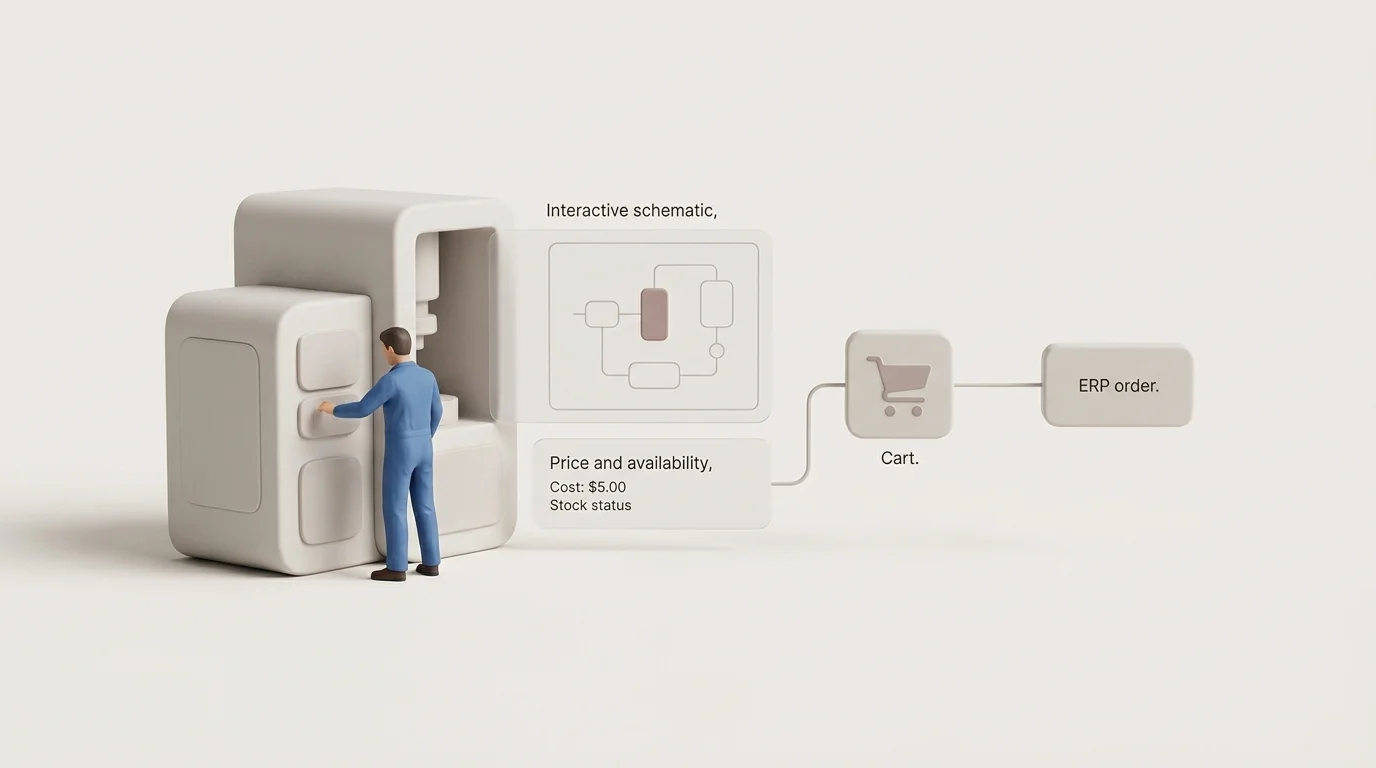
The daily workflow demonstrates this difference. After signing in, a dealer searches by machine model or serial number, opens an interactive schematic, and selects a bill of materials (BOM) item to view the pricing and availability tied to their specific account. They add the required item to a cart and submit the order, prompting the ERP to process the transaction and return the confirmation, status updates, and invoice history directly to the portal interface.
Deployment models allow for varied access controls. Manufacturers often permit guest browsing for basic catalog content while requiring authentication to view account-based pricing, customer documents, and checkout functions. A site visitor might land on a public page, enter a model number, and view an exploded diagram to identify a broken sensor. Because they are not logged in, the system hides the part price and displays a dealer locator prompt. Systems Online's web login documentation outlines how administrators configure this authenticated access alongside optional public viewing.
Core Features in a Manufacturing Parts Portal
Visual Identification, BOMs, and Supersessions
A parts portal requires multi-layered search capabilities, allowing buyers to query by model, serial number, part number, and plain-text description. Once they locate the equipment, they interact with 2D or 3D schematics featuring multi-shape hotspots, zoom controls, and clickable callouts. Part attributes and "where used" data help verify the selection before the item reaches the cart.
A generic SKU catalog does not capture all the technical relationships that define whole goods manufacturing. A dedicated portal natively handles bills of materials, kits, assembly groupings, and serial-number effectivity. When engineering changes a component, the platform can track superseded and alternate parts, displaying relevant installation notes and service documents alongside the new replacement item so technicians order the correct configuration.
Account-Specific Pricing, Availability, and Ordering
Product visibility and pricing change depending on the authenticated user. The Dealect portal gives each dealer an individual price list, shows the dealer's margin and order history, and controls which products the account can quote. Dealers configure products, create quotes, and place orders in the portal, while approved builds can flow into the manufacturer's ERP. Dealect combines custom configuration and dealer quoting with ordering and ERP integration.
The transaction cycle only succeeds when the submitted order reaches the ERP. Confirmation and fulfillment status updates flow back to the web interface, and the system should log and retry transactions when background integration services time out or fail.
Roles, Permissions, and ERP Integration
Smith A provides partner zones and document management in a B2B portal for manufacturers and distributors. Partner zones include individual pricing, marketing materials, and support, while document management covers technical documentation, certificates, and marketing materials. Each partner sees only the information permitted for that account, and the portal connects to ERP and CRM.
EzParts supports these detailed workflows by linking visual identification with customer-specific commerce. The platform allows dealers to search by machine serial number, interact with hotspotted illustrations, and view replacement-part histories. Using a dedicated parts portal CMS, manufacturers integrate directly with business systems to fetch the live availability, pricing, and order status matching the authenticated user.
Field-Service Access Across Web, Mobile, and Offline Channels
Mobile and Offline Catalog Workflows
Responsive browser access serves office-based buyers and dealers working at a parts counter, while field technicians operating in remote agricultural, construction, industrial, or transportation environments face entirely different constraints. They frequently work in metal-clad buildings or remote sites without reliable cellular data.
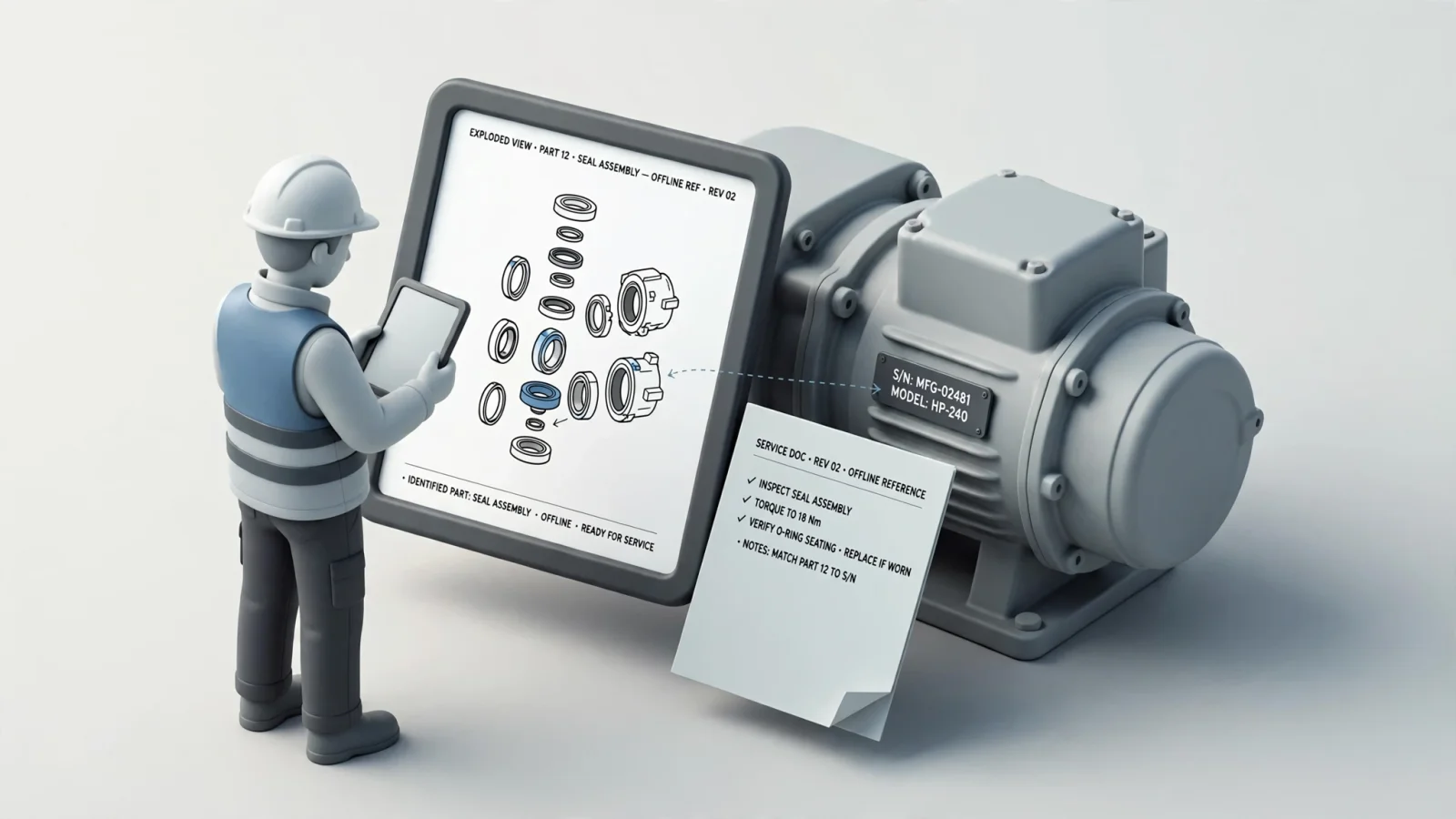
With an offline-first profile, the mobile app downloads data to the device and runs offline-first after the initial sync. The app starts synchronization when it is active and connected, and administrators can allow technicians to sync only over Wi-Fi, a setting recommended for limited cellular bandwidth.
When connectivity returns, the application synchronizes the cached data so the technician can submit the live order, check real-time warehouse inventory, and view current account pricing. Catalog updates from the manufacturer can sync in the background when connectivity returns, helping keep offline media current without manual intervention.
Printable Parts Books and Service Documents
PDF files can remain practical in manufacturing environments, serving as compliance records, training materials, and printable references for technicians at the job site.
The underlying architecture treats structured catalog data as the single foundation for both interactive web experiences and on-demand printed documents. An automated print engine can generate branded, language-specific PDF parts books directly from the digital catalog. This approach helps keep the printed output aligned with the current digital revision, reducing the need to maintain separate publishing workflows for web and print.
Choosing the Right Delivery Model
Manufacturers choose between cloud-hosted SaaS, OEM-hosted enterprise deployment, browser access, native mobile apps, and distributed media based on specific operational needs. Real-time data keeps pricing and order status accurate, whereas cached data keeps offline diagrams and documents available. The selected delivery medium determines which features remain available in the field, because browser constraints differ from native mobile storage capabilities.
Integration, Data Governance, and Trust
Connect ERP, CAD, PLM, MES, and Service Data
The customer experience relies on disciplined back-end data flows. Manufacturers map the source of truth for every system touching the portal, recognizing that product data, model applicability, BOMs, and supersessions typically originate in CAD or PLM systems. Meanwhile, customer accounts, pricing, inventory, orders, shipments, and invoices live in the ERP.
Mapping the integration contract for each piece of data determines whether the flow is one-way, bidirectional, real-time, scheduled, or cached. The portal provides the external user interface, while the ERP remains the operational system of record. Systems Online supports this specific enterprise integration across SAP, Oracle, Microsoft AX, Epicor, and various MES environments, matching portal capabilities to the existing backend architecture.
Keep Parts Information Accurate and Current
Governance dictates portal accuracy. Manufacturers enforce strict part-number standards, revision control, and effectivity ranges to maintain trust. In a governed implementation, when an engineer updates a 3D model in CAD, the PLM system versions the assembly, prompting the portal to ingest this update, hot-spot the new geometry, and map the updated BOM without breaking existing cart workflows. This prevents dealers from ordering outdated components that no longer fit the current equipment chassis. Maintaining this accuracy alongside translated part descriptions, supersession logic, and pricing ownership requires clear auditability.
Build Security and Accessibility into the Portal
For API endpoints, the OWASP API Security Top 10 identifies broken object-level authorization, broken authentication, and unrestricted resource consumption among its risks. OWASP says object-level authorization checks should be considered in every function that accesses a data source using an ID from the user, and the list also covers broken function-level authorization, security misconfiguration, improper inventory management, and unsafe consumption of APIs.
Field usability depends on interface accessibility aligned with W3C's Web Content Accessibility Guidelines 2.2. Developers should ensure part names remain searchable via keyboard, provide text alternatives for diagram information, implement keyboard-accessible controls, and make focus states highly visible. Touch targets should accommodate technicians wearing gloves, and text should remain readable in bright outdoor conditions without relying on color as the sole distinguishing factor.

How to Evaluate and Roll Out the Right Portal
Evaluate the Complete Workflow, Not Just the Feature List
Avoid evaluating software based on a generic feature matrix. Test how buyers actually identify an unknown part, handle serial-number effectivity, view account pricing, and recover from a failed transaction.
| Evaluation Area | Generic B2B Portal | Parts-Focused Manufacturing Portal |
|---|---|---|
| Product discovery | SKU, category, keyword search | Model, serial, schematic, part number, description |
| Product data | Basic catalog attributes | BOMs, effectivity, replacements, kits, service notes |
| Commerce | Cart, checkout, order submission | Cart connected to technical identification and account rules |
| Pricing | Customer or contract pricing | Dealer, branch, quantity, and order-type rules |
| Documentation | General document library | Contextual manuals, service bulletins, parts books |
| Field use | Responsive browser | Browser, native mobile, offline, and distributed catalogs |
| Data maintenance | Basic product administration | CAD/PLM/ERP governance and revision workflows |
Pilot One Equipment Family
Documenting current workflows establishes a baseline before deployment. You will audit catalog and customer data, define the integration sources of truth, and choose the correct delivery channels. Start the rollout by piloting one equipment family with one specific dealer or service group. Launching the portal to all dealers simultaneously risks a flood of support tickets from a single misconfigured pricing table. Piloting with one trusted dealer verifies that the ERP returns the correct negotiated discount tier and confirms that a field technician can successfully synchronize an offline catalog package before you deploy the mobile app across the wider service fleet. Testing the full path from model identification to parts selection, pricing, cart, ERP submission, and order-status visibility ensures stability before expanding the program to other product lines.
Measure Adoption, Accuracy, and Order Performance
Track internal baselines to measure success instead of relying on broad industry benchmarks. Monitor search-to-part-detail completion rates, schematic-to-cart activity, incorrect-part corrections, order-entry rework hours, and support contacts regarding order status. You can also measure catalog update latency, price accuracy, submission failures, offline synchronization success, and overall digital aftermarket sales. Systems Online builds EzParts to support this complete lifecycle, giving manufacturers the operational foundation to track and improve these specific metrics.
Questions Manufacturers Ask Before Launch
Does a Portal Replace the ERP?
The portal handles the external customer and dealer experience, while the ERP remains the operational system of record for inventory management, pricing logic, accounting, and order fulfillment. The two systems exchange data rather than replacing one another, so internal staff and external buyers can work from the same underlying records.
Can Dealers See Their Own Pricing and Availability?
Provided the portal correctly maps customer accounts and business logic to the relevant back-end systems, dealers log in and see their specific price levels, product visibility rules, and warehouse availability. This capability depends on proper account mapping and ERP integration.
Can Field Technicians Use It Offline?
Certain platforms offer offline access for specific catalog tasks. EzParts provides offline schematic and service-information capabilities through native mobile or distributed deployments, allowing technicians to view diagrams and BOMs while disconnected. Live pricing, inventory checks, and final order submission generally still require an active network connection to process the transaction.
Which Delivery Model Works Best?
The choice among cloud-hosted SaaS, on-premises enterprise deployment, browser access, and mobile delivery depends entirely on user location, IT policy, and integration needs. Manufacturers benefit from choosing a system that helps buyers correctly identify a part before asking them to place the order. By connecting technical documentation with aftermarket commerce, a purpose-built B2B customer portal for manufacturers streamlines the entire ordering process.
See how EzParts connects interactive parts identification, aftermarket ordering, ERP data, mobile access, and offline service workflows for equipment manufacturers. Request an EzParts demonstration today, or explore our electronic parts catalog and aftermarket eCommerce options at sysonline.com.
Modified on: 09/21/2026