Blog » Field Service Mobile Parts Ordering App Guide
Field Service Mobile Parts Ordering App Guide
A technician crouches beside a downed excavator, where the failed hydraulic pump is visible but the exact configuration is uncertain. Identifying the right replacement requires knowing the model year, the serial number breaks, whether the original component was superseded, and whether the replacement requires a separate seal kit. Only after those facts are established does the inventory count or the checkout process matter. When service calls stall, the root cause is rarely an inability to push a buy button on a screen. Instead, the failure happens earlier in the diagnostic chain when field personnel cannot verify whether a part number matches the specific machine in front of them.
A field service mobile parts ordering app solves an identification problem first and a purchasing problem second. Generic field service management applications handle work orders, scheduling, and technician routing, while mobile electronic parts catalogs organize technical content, part fitment, and aftermarket commerce. Ordering errors happen when these two disciplines fail to overlap. If a work-order system only provides a blank text field for entering a part number, it forces the technician to consult disconnected paper manuals, static PDF files, or call a back-office parts interpreter. This disjointed handoff can introduce manual transcription errors, delay equipment repairs, and create avoidable returns across the dealer network.
The complete workflow should guide the user along a structured path:
- Identify the equipment through model, serial number, or vehicle identification number (VIN).
- Open the relevant catalog section, assembly, or service bulletin.
- Locate the correct part using interactive schematics or filtered search.
- Verify the selection against supersessions, kit requirements, and serial breaks.
- Review commercial information including regional inventory, dealer pricing, and availability.
- Add the part to a work-order request, replenishment order, or checkout cart.
- Validate and submit the transaction against live enterprise resource planning (ERP) business rules.
- Synchronize the record to update work orders, inventory ledgers, and customer invoices.
Systems Online builds EzParts to sit exactly at this intersection, functioning as the catalog and commerce layer that connects technical documentation, dealer channels, offline field access, and ERP workflows. Manufacturers can use this architecture to distribute a shared catalog across native mobile apps, web browsers, and distributed offline media. By linking rich engineering data directly to commercial transactions, equipment builders give their service networks the tools to identify components correctly on the first attempt.
Evaluating how a platform handles the journey from equipment identification to the final order submission determines whether a mobile application helps technicians fix equipment or merely creates bad data for the back office. The sections below outline the critical technical capabilities, offline data models, integration methods, and demonstration tests necessary to evaluate these platforms.

Evaluate Equipment Identification and Fitment
Fast search is useless if it returns parts for the wrong configuration. Look for a system that establishes the equipment context before displaying technical data. Technicians should filter the catalog by product line, model, serial number, or vehicle identification number (VIN), so the application automatically filters out assemblies and components that do not apply to that specific machine. Heavy equipment, agricultural machinery, and industrial systems can undergo engineering revisions throughout a production run. A single model name may encompass multiple minor revisions, optional attachments, and regional engine configurations. Without serial-specific filtering, a user may have to choose between several alternator brackets or different wiring harness layouts, which can lead to misordered parts and repeated truck rolls.
Text search works well for known parts, but unfamiliar failures require visual navigation. Interactive schematics let users tap a hotspot and immediately view the corresponding part details. Moving between a 2D or 3D diagram, the parts list, and the bill of materials (BOM) must happen without losing the context of the selected machine, so evaluate the software for zoom and pan capabilities, synchronized callouts, and the ability to add multiple items to a cart directly from the drawing. A field technician may encounter assemblies where individual part numbers are weathered, missing, or obscured by grease. In these situations, navigating through a visual assembly diagram allows the user to pinpoint the physical location of the component, click the matching callout balloon, and confirm the exact manufacturer part number without leaving the drawing view.
Engineering changes mean original parts can be replaced, requiring the platform to display supersession relationships clearly by indicating effective serial ranges, regional restrictions, and whether the replacement is a direct drop-in. When an engineering team updates a component, the old part number might be replaced by a newer version, or it might split into multiple components depending on the machine's build date. The application must display the complete replacement chain, explaining whether the old part is backward-compatible or if it requires additional hardware.
Kits complicate this further. The app needs to distinguish between a single component and a required assembly by showing required companion parts or installation notes. For instance, replacing a hydraulic cylinder might mandate new O-rings, mounting bolts, and a specific fluid filter. If the catalog displays only the bare cylinder without highlighting the required seal kit, the technician arrives at the customer site with an incomplete repair package. EzParts electronic parts catalog software lists automated supersession chains, kit and assembly component display, and schematic-linked BOM data as built-in capabilities. Because platforms vary, have the vendor prove these capabilities during a demonstration.
A well-designed field tool also provides redundant search methods to accommodate unpredictable job site conditions. Technicians should be able to locate components through:
- Direct barcode or QR code scanning on machine data plates or component packaging.
- Keyword and metadata searches that match colloquial component descriptions.
- Partial part-number queries with wildcards.
- Contextual search constrained strictly within the currently viewed sub-assembly.
- Cross-references to technical service bulletins and service documentation.
When visual navigation and diverse search options work together, service personnel can confirm fitment more efficiently, even when the initial information is incomplete.
Test the Mobile Parts Ordering Experience
A useful mobile workflow supports both rapid data entry and visual discovery. A technician who knows the exact replacement part number should be able to type it in and proceed immediately to availability, while one who only knows the visual location of the failed component needs the interactive schematic path. Check that the touch targets are large enough for field conditions, images load clearly, and the orientation adapts to the device screen. Technicians often work in harsh, outdoor environments while wearing protective gloves or holding a tablet in direct sunlight. Small buttons, tiny drop-down menus, and unreadable diagram labels frustrate users and slow down repairs. The user interface must emphasize clear navigation, high-contrast visual elements, and single-tap actions for common tasks like adding items to a pick list.
Because field service involves different types of transactions, from work-order parts requests and truck-stock replenishment to shared pick lists and direct customer orders, these transactions require software that adapts to the business process rather than forcing every transaction into a standard retail checkout cart. A field technician rarely operates like an online consumer buying a single retail product. Depending on the job, the user might need to:
- Tag selected parts directly to an open field service work order for customer billing.
- Create an internal stock transfer to pull replacement parts from a local dealer branch.
- Request truck-stock replenishment from an OEM regional distribution center.
- Build a saved draft cart or quote for customer approval before placing the order.
- Generate a shared pick list for a warehouse worker to stage components prior to morning dispatch.
Forcing all of these distinct business activities through a generic consumer checkout cart creates administrative friction. For that reason, the mobile application needs to understand these varied transaction types and apply the correct routing, cost centers, and approval workflows automatically.
The same catalog platform may serve multiple audiences, meaning a manufacturer might grant internal technicians access to unreleased schematics, provide dealers with wholesale pricing, and restrict equipment owners to public replacement parts. Evaluate how the platform uses role-based access to segment pricing, inventory visibility, and ordering permissions so one catalog safely supports the entire service network without exposing inappropriate data. A single digital catalog database should serve the OEM service team, independent authorized dealers, fleet managers, and end customers. Role-based security rules allow administrators to present a tailored interface to each user tier, ensuring dealers see their contracted wholesale discounts while retail customers see suggested list prices, all without maintaining separate, redundant catalog databases.
Treat Offline Support as Three Separate Capabilities
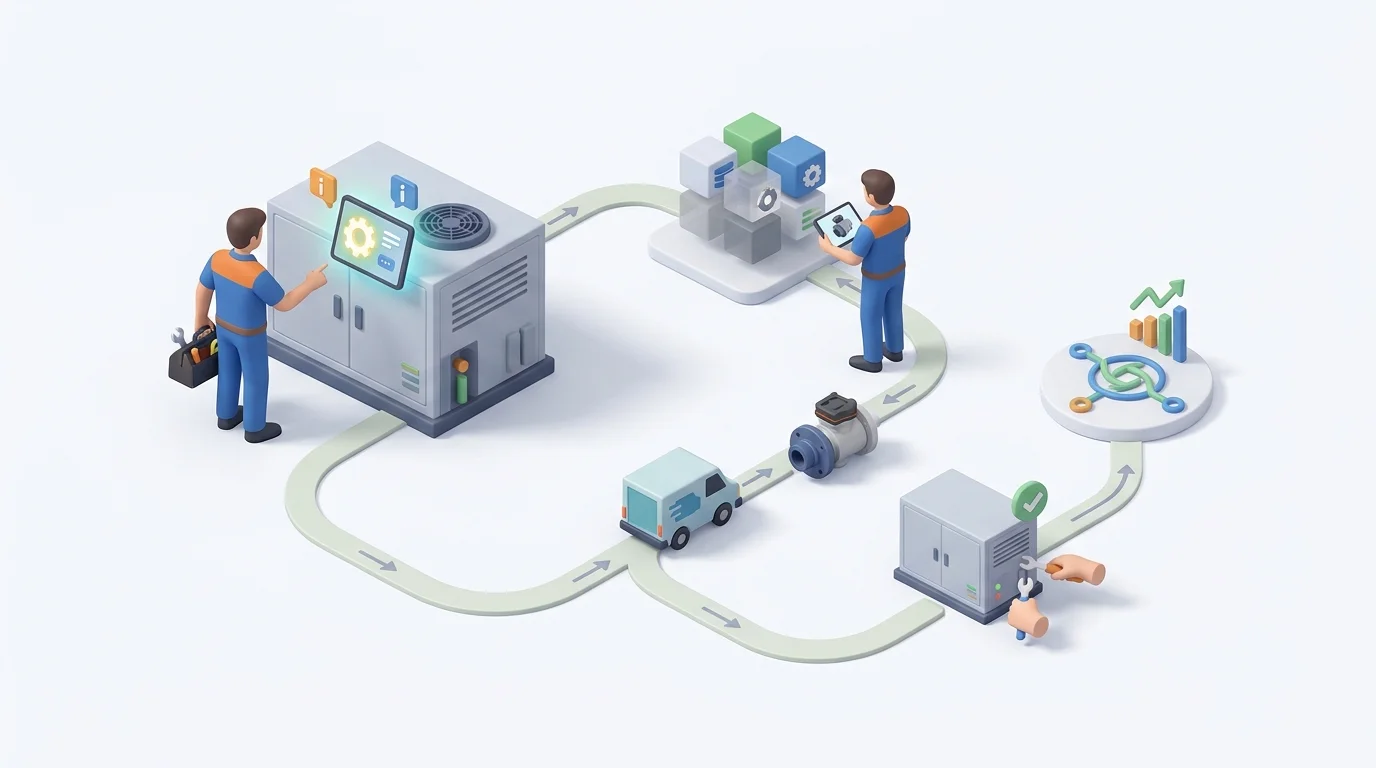
Disconnected environments expose the difference between a caching trick and true offline engineering. Treat offline support as three distinct layers to understand what a platform actually does when the cellular signal drops. Field service personnel may work in remote agricultural fields, underground mining sites, ship engine rooms, and rural utility corridors where network connectivity is intermittent or nonexistent. If an application relies on a constant web connection to render diagrams or look up part numbers, the technician is effectively locked out of the catalog. However, vendors often claim offline capability without explaining the strict boundaries of disconnected operations.
First, look at catalog access: the mobile device stores selected models, schematics, BOMs, and supersession data. Systems Online's product documentation describes native mobile apps that store catalog data on the device, allowing technicians to browse technical documents and navigate diagrams without an active connection, keeping the repair diagnosis moving forward. Local storage must include the high-resolution graphical schematics, parts lists, fitment rules, and associated service bulletins. When the app stores this data directly on the device filesystem or an embedded database, navigation can continue without relying on the cellular modem.
Second, evaluate offline work capture. Generating a draft cart, pick list, or parts request while disconnected captures the technician's intent right next to the machine, as the application records the selected part numbers, quantities, and associated notes securely in local storage. Technicians can continue diagnosing issues, tagging failed components, and building multi-line parts lists across several assemblies. The app stores these staging records locally, queuing them until the device detects a stable network connection.
Third, test online transaction validation. Microsoft's Field Service offline guidance says inventory validation doesn't run without network connectivity, so offline inventory data cannot substitute for a live validation check. Test how the platform handles transactions that depend on that check when connectivity returns.
When the device reconnects, the application must refresh price and inventory, revalidate supersessions to ensure the chosen part was not discontinued since the last sync, apply current business rules, and finally submit the transaction. Asking vendors exactly how their platform handles stale data, conflicts, and failed syncs reveals its true capabilities. If a technician selects a part offline that was superseded or depleted since the last sync, the application cannot blindly push the old order through. It must alert the user upon reconnection, highlight the changed line item, and offer the updated part number or alternative warehouse source before finalizing the submission. Offline behavior also varies by implementation. SAP documents separate online and offline parts-search modes, with offline searches using data loaded during synchronization and online searches querying the back end. The safest conclusion for buyers is that offline support keeps technicians working, while live commercial validation handles the actual transaction.
Verify Inventory, Pricing, Fulfillment, and ERP Integration
A field service mobile parts ordering app becomes powerful when it connects to the enterprise. The application should create a connected transaction backed by accurate commercial data rather than sending a blind SKU request to an inbox. Evaluate whether the platform displays regional inventory, dealer stock, OEM warehouse availability, and accurate customer-specific pricing. When technicians order parts from the field, they need immediate visibility across multiple inventory tiers. If a component is out of stock on the service van, the application should display quantities at the nearest dealer branch, neighboring territory vans, regional distribution centers, and the OEM central warehouse.
A complete system accounts for fulfillment-center selection, backorder status, substitution logic, and carrier restrictions. Checking for a timestamp or indicator of data freshness on the item detail screen helps users assess that accuracy. If a user builds a cart from cached data, the system must automatically recheck price and availability before final submission to prevent the back office from receiving orders for parts that went out of stock hours ago. Field workflows may depend on urgent shipping deadlines. The software should indicate order cutoff times for next-day air freight, highlight hazardous material transport restrictions, and allow the technician to split fulfillment across multiple stocking locations if doing so gets the critical repair components on site faster.
Understanding the trade-off between live queries and batch synchronization helps shape the deployment. Live queries request current inventory, pricing, and order status directly from the ERP, but actual freshness depends on the integration. Batch or delta synchronization handles the heavy, stable catalog data such as 3D schematics, BOMs, and service manuals. Systems Online acts as this bridge, taking parts catalog software beyond visual identification to support direct connections to major business systems. Verify that the platform can import product hierarchies, pass dealer identity, apply regional business rules, insert the order into the ERP, and return an accurate status code to the user in the field.
A reliable enterprise integration should execute several distinct data exchanges:
- Ingesting engineering BOMs, CAD exports, and product hierarchies from PLM or PDM platforms.
- Querying live pricing matrices, customer-specific discount tiers, and tax rules from the ERP.
- Fetching multi-location inventory balances and expected replenishment dates.
- Passing structured purchase orders, work-order part allocations, or warranty claims into the ERP.
- Returning confirmation numbers, tracking details, and shipment status codes back to the technician's device.
This bidirectional communication allows data entered on a tablet beside a machine to flow directly into the central enterprise ledger without requiring manual data re-entry by back-office staff.
Compare Delivery Models, Data Scope, and Security
Because no single delivery method fits every organization perfectly, compare the technical trade-offs before committing to an architecture. Equipment manufacturers must weigh field connectivity patterns, IT maintenance capabilities, device ownership models, and update frequencies when selecting how to deploy mobile catalog applications.
| Delivery Model | Primary Advantages | Main Trade-offs | Best Fit For |
|---|---|---|---|
| Native Mobile App | Predictable offline behavior, robust local database storage, tight hardware integration like camera barcode scanning, responsive multi-touch gestures. | Requires app store deployment governance, dedicated testing across iOS and Android, and coordinated client-side update cycles. | Technicians operating frequently in remote areas, underground facilities, or regions with unreliable cellular infrastructure. |
| Mobile Web Browser | Centralized server updates, zero installation friction on technician devices, immediate compatibility across phones, tablets, and desktop workstations. | Offline capabilities rely on browser caching storage limits, while visual performance depends heavily on active network bandwidth. | Authorized dealerships, depot repair service desks, warranty processing teams, and consistently connected fleet facilities. |
| Distributed Media | Complete independence from network infrastructure, high local rendering performance, isolated from cloud connection downtime. | Demands disciplined physical or digital package update distributions, along with manual reconciliation of synchronized transactions. | Highly secure defense sites, remote maritime vessels, offshore drilling platforms, or isolated mining operations. |
Compare downloading full catalogs with targeting specific packages: Microsoft's Field Service offline profile guidance sets a maximum of 15 linked tables, including downstream tables, and recommends limiting the amount of data in the offline profile for faster, more efficient syncing. It also advises against using "All records" and gives records related to scheduled work orders as an example of a narrower filter, so administrators should design offline profiles with synchronization performance in mind.
Local storage means sensitive data lives on the tablet in the truck. If the offline package includes customer records, wholesale pricing, equipment serial numbers, or draft transactions, security becomes a priority. OWASP's Mobile Application Security Verification Standard says apps should securely store sensitive data on the device, so evaluate authentication, role-based access controls, encryption at rest, secure logging, and remote-wipe procedures. Security requirements for network traffic and data in transit must also apply during every synchronization event. If a field tablet is stolen or misplaced, encrypted local storage can reduce exposure of proprietary engineering drawings, custom dealer discount structures, and customer equipment lists.
PDFs can still serve field operations alongside interactive delivery, since a dynamic print engine can coexist with the mobile platform to generate branded parts books from the same master data for archival or offline use. Some field service operations maintain paper binders or static PDF archives for regulatory compliance, warranty audits, or legacy equipment documentation. Systems Online offers a template-based print engine that generates branded PDF parts books on demand, so print-oriented users and mobile-first technicians can work from the same master data source.
Run a Field-Condition Vendor Demonstration
Turning these criteria into a practical evaluation means treating a slide deck as insufficient proof of functionality. Run the airplane-mode acceptance test using a real equipment model to see how the software behaves under actual field conditions. A live demonstration using complex, multi-level assemblies from your own product lines reveals whether the application handles real-world engineering data or merely performs well on simplified sample files.
- Ask the vendor to load a synchronized equipment model onto a tablet.
- Enable airplane mode on the device to sever all network connections.
- Search for a part by its text description.
- Locate an unfamiliar component visually through an interactive schematic.
- Confirm a superseded-part relationship and review the associated installation notes.
- Add the item to a draft cart or pick list.
- Disable airplane mode and reconnect the device to the network.
- Watch the application refresh the price and availability data.
- Submit the transaction and verify the resulting order or request status.
- Ask the vendor to demonstrate what happens if the part was discontinued or the price changed while the device was disconnected.
When observing the demonstration, pay close attention to how the application handles data friction. If the schematic takes too long to render after each zoom gesture, technicians will abandon the visual tool in favor of calling the parts desk. If taking the device offline breaks search functionality or causes the application to freeze, the offline mode is built on superficial caching rather than robust local storage. Furthermore, verify whether the system clearly alerts the user when commercial terms change during reconnection, rather than failing silently or rejecting the entire transaction without an explanatory error code.
Score the platform across fitment accuracy, schematic usability, offline catalog access, offline work capture, live validation, and ERP integration, tracking whether each capability was actively demonstrated, merely configurable, dependent on a custom integration, or promised for a future release. Structuring the evaluation around verifiable technical milestones protects the organization from committing to software that looks capable in a controlled presentation but fails in a remote service truck.
Some field service applications focus heavily on technician scheduling and work-order management but treat technical documentation and part identification as an afterthought. Manufacturers and dealers need a dedicated catalog and commerce layer to eliminate ordering errors at the source.
Systems Online provides this layer. By combining interactive schematics, fitment logic, and enterprise integration, EzParts is designed to help users identify and order the right part, whether the user is online or offline.
See how EzParts connects interactive parts identification, mobile access, offline catalog browsing, and ERP-backed parts ordering. Schedule a demonstration at Systems Online.
Modified on: 08/25/2026