Blog » Self Service Parts Ordering System Guide
Self Service Parts Ordering System Guide
A self service parts ordering system helps manufacturers eliminate aftermarket ordering errors and boost parts sales through multi-channel, interactive electronic parts catalogs that integrate with existing ERPs. This workflow connects technical identification with the commercial process, so buyers can move from the right equipment context to a valid order.
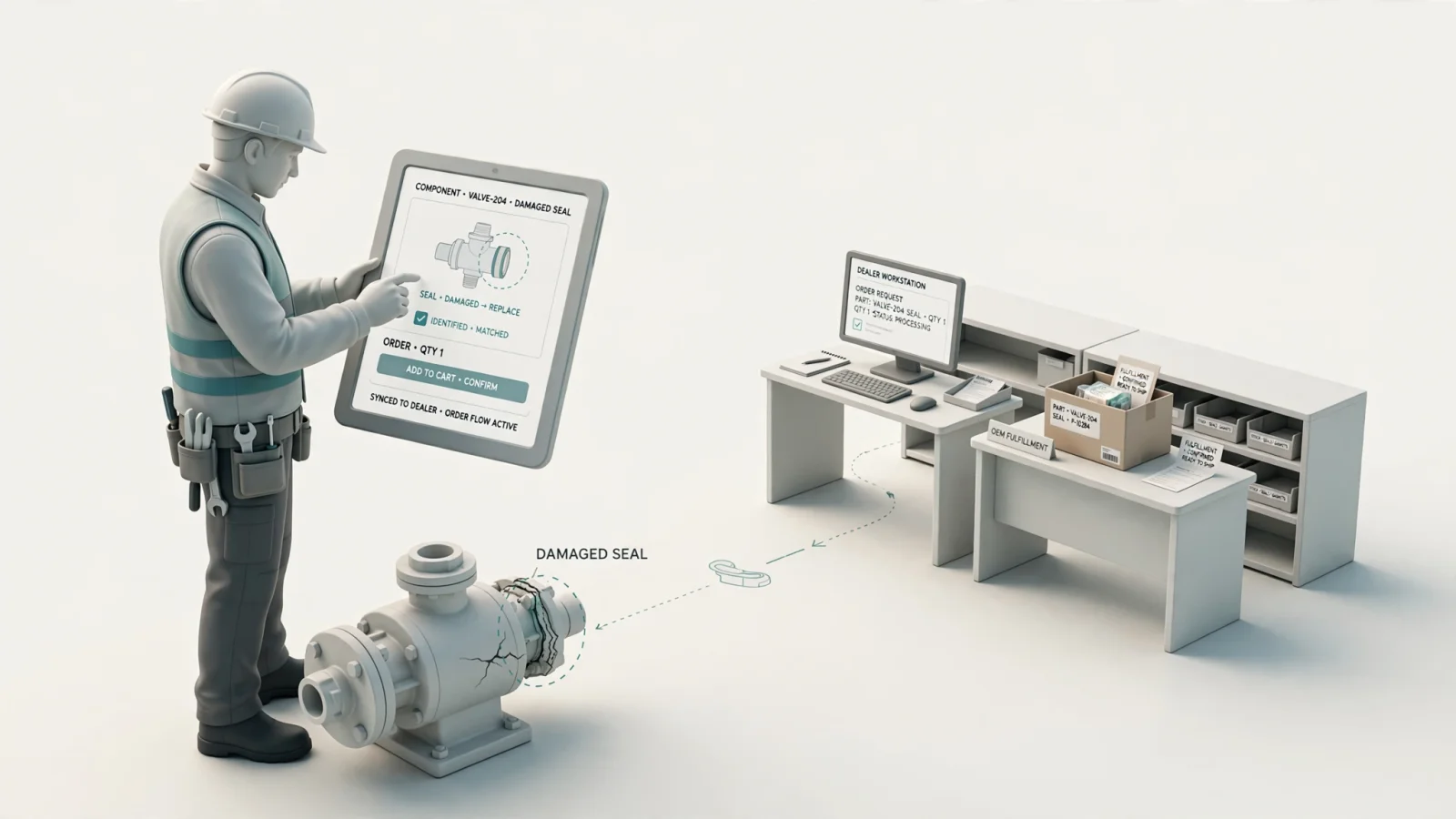
A technician identifies a damaged component on an equipment schematic. Because the available manual is a static PDF, the identified part might have been superseded years ago. The manufacturer's service team then has to manually confirm availability, verify the replacement part, and re-enter the transaction into the business system. This manual cycle creates friction, wastes time, and risks sending the wrong item to the field. A self service parts ordering system connects technical identification and purchasing into a single continuous workflow. For manufacturers evaluating platforms in this category, Systems Online’s EzParts combines electronic parts catalog software with aftermarket eCommerce to manage the entire process from visual identification to order fulfillment.
Bridging the Gap Between Technical Identification and Purchasing
From Static Manuals to Guided Ordering
Guided ordering allows an authorized dealer, technician, or equipment owner to identify a replacement part, validate it against the equipment configuration, view commercial information, and submit an order without requiring staff to rebuild the transaction manually. Moving from static manuals to guided commerce removes the gap between figuring out what is broken and buying the exact component needed to fix it.
Digital workflows organize complex machine data so buyers only see the components relevant to their specific serial number or configuration. This approach reduces wrong-part risk by restricting choices to compatible items, enforcing replacement rules, and hiding obsolete inventory.
Catalog, Portal, Ordering System, and ERP
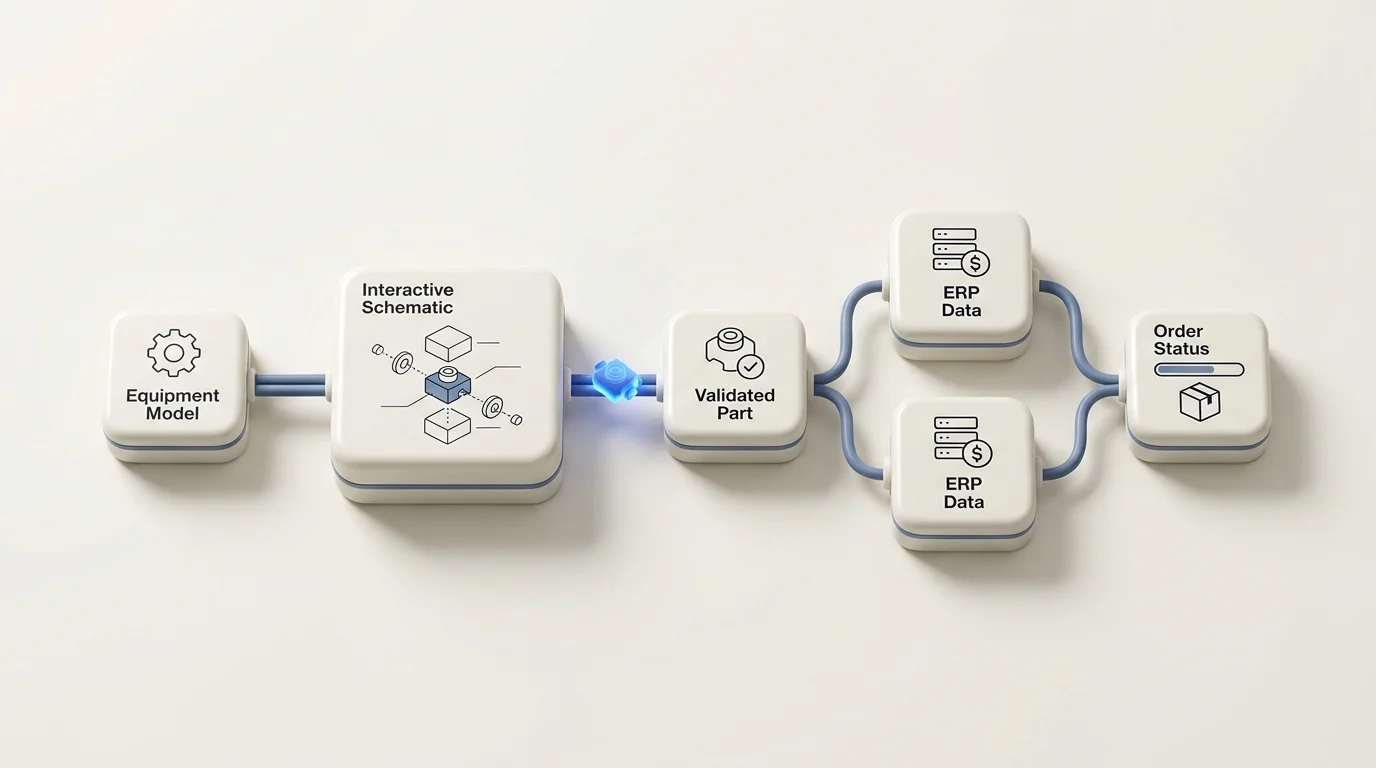
The complete workflow relies on four distinct layers working together. The electronic parts catalog organizes the technical product information, including schematics, bills of materials, and supersession chains. The parts portal controls user access, determining which catalogs a specific dealer or customer can view. The ordering system adds the shopping cart, checkout constraints, and order routing logic. Finally, the ERP integration connects the front-end catalog activity to the manufacturer's inventory, pricing, customer records, and fulfillment systems.
Software like EzParts manages the catalog, portal, and ordering layers while exchanging data with the underlying business systems. This connection is central to Systems Online's approach, because the interactive catalog supports the identification experience while existing business systems remain the source for commercial and fulfillment data. For example, a recent SAP spare-parts workflow guide demonstrates how buyers can select items from an external catalog and bring them into a structured order that tracks material, quantity, delivery dates, storage locations, and invoicing.
Connecting Catalog Data to Commerce Workflows
Assemble and Govern Product Data
The system requires an authoritative source for part numbers, descriptions, drawings, revisions, and structural relationships. Manufacturers typically assemble this data from CAD, PDM, PLM, PIM, ERP, and existing technical documentation. Setting up the platform means establishing clear ownership for each data element. For example, the PLM might own the engineering bill of materials while the ERP handles pricing and inventory status. EzParts imports and structures these inputs to build an interactive catalog that reflects current engineering and commercial realities.
Identify and Validate the Part
Buyers interact with the assembled data through multiple identification paths. A dealer might search by a known part number to quickly build a restock order, while an equipment owner browses by model name to select a component from an interactive 2D or 3D schematic. As the buyer navigates the catalog, the software applies identification rules based on the model, product configuration, serial-number range, VIN, region, or customer account.
These rules validate that the selected item fits the specific equipment in question. For example, if a manufacturer builds identical-looking machines with different regional voltage requirements, the configuration logic hides the incompatible electrical components from view.
Submit, Fulfill, and Track the Order
Once the buyer identifies a valid part, the commercial layer takes over. The platform presents customer-specific pricing, dealer discounts, available inventory, warehouse locations, and shipping constraints, while required kits and mandatory accessories influence the final cart contents.
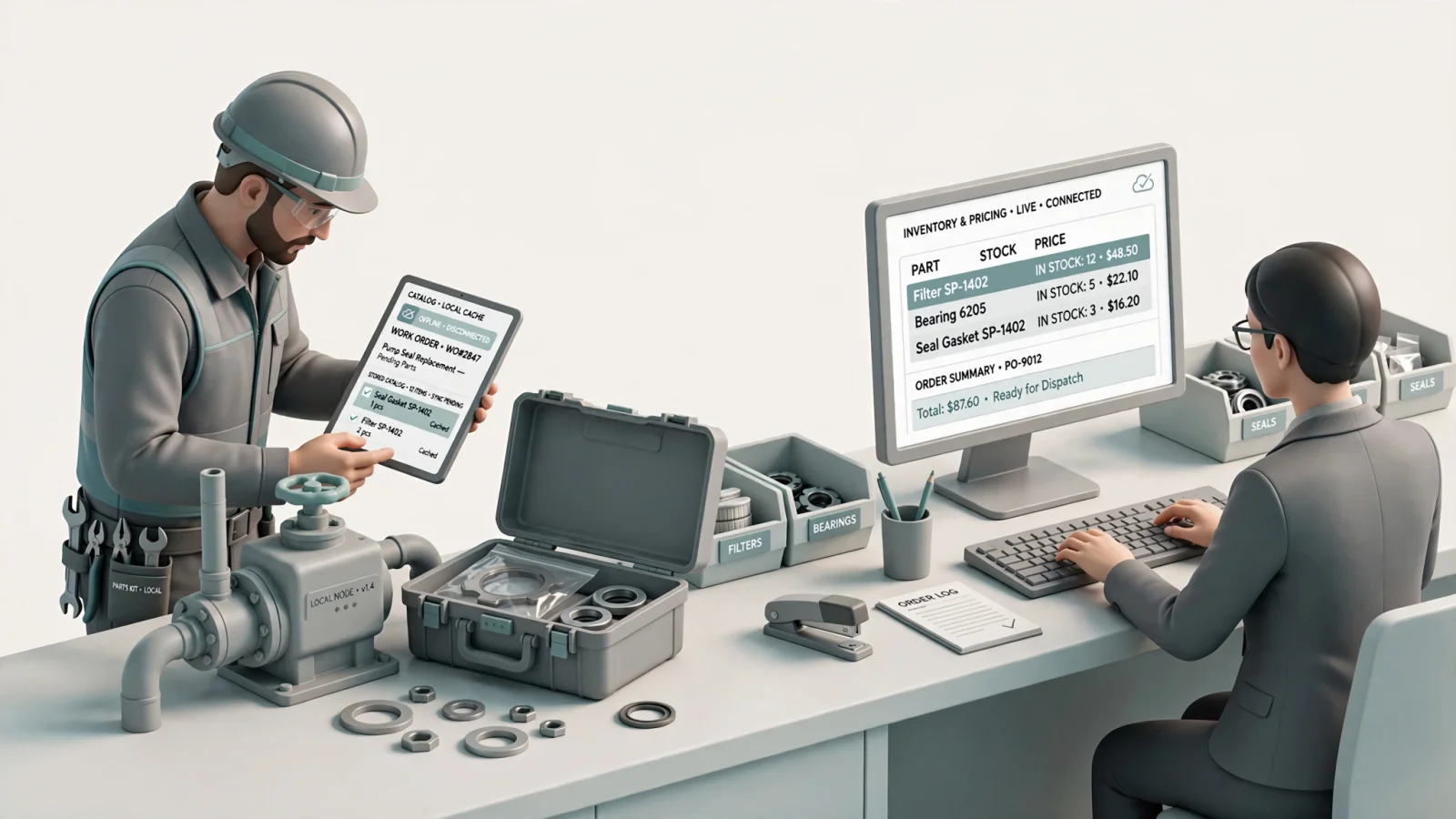
After checkout, the system handles order insertion into the ERP, sends a confirmation, and tracks shipment or back-order status. Manufacturers can choose whether to use live or batch data for these steps. Live connections provide exact inventory counts at the moment of checkout, whereas batch updates support remote environments lacking continuous network access. Systems Online supports exchanging business-system data through both methods depending on the deployment architecture. That flexibility helps manufacturers align a self service parts ordering system with existing ERP processes instead of forcing every deployment into one data-exchange model.
Capabilities That Reduce Parts-Ordering Friction
| Capability | The Problem It Addresses | What to Ask During a Demonstration |
|---|---|---|
| Interactive Schematics | Users order the wrong item when guessing from text lists. | Can users click a hotspot on a drawing to add the item directly to their cart? |
| Model & Serial Fitment | Users select parts belonging to a different machine variant. | Does the catalog filter available components when a specific serial number is entered? |
| Supersession Management | Users try to order obsolete or discontinued items. | How does the system handle a part that has been replaced by a different component? |
| BOM & Kit Grouping | Users order a single piece when they need the entire assembly. | Can the platform automatically display mandatory kit components during selection? |
| Custom Business Rules | Dealers and end-users see incorrect prices or restricted items. | Can we assign different visibility, pricing, and checkout rules based on user roles? |
Visual Identification, Search, and Fitment
Visual identification lowers the technical barrier for equipment owners and new technicians. Interactive schematics with multi-shape hotspots let buyers visually confirm the physical shape and location of a component before ordering. Search features support both description lookups and speed-entry for known part numbers, and connecting these search tools to model, serial, and VIN data provides exact fitment context. The system also collects part-specific information, such as paint color or one-time-use authorization codes, directly at the time of selection.
Supersessions, BOMs, Kits, and Business Rules
Manufacturers update equipment continuously, creating a web of obsolete and replacement components. Global, regional, and model-specific supersessions guide buyers away from discontinued items and toward valid replacements. Bill of materials (BOM) integration and kit relationships guarantee a complete order. If a specific pump requires a matching gasket and mounting bracket for installation, the software prompts the buyer to add the mandatory accessories.
Availability, Pricing, and Order History
Friction increases when buyers have to leave the catalog to check their dealer price or confirm warehouse stock. Combining technical validation with customer-specific catalog visibility, permissions, pricing, and discounts keeps the buyer in one interface. The system routes the submitted order based on predefined rules, checks available inventory, and provides order-status history. EzParts presents this commercial data alongside the technical schematics to reduce support calls regarding back-order status or shipment tracking.
What Each Stakeholder Needs From the Experience
OEMs: Governance and Aftermarket Control
Equipment manufacturers require one governed source for parts content. Maintaining separate engineering drawings, static PDF manuals, and eCommerce storefronts almost guarantees that data will drift out of sync. By moving to a unified platform, OEMs gain configurable access controls, distinct dealer and end-user channels, and direct ERP connectivity. Centralizing the ordering workflow provides immediate visibility into aftermarket demand, which helps optimize spare-parts inventory. The platform also generates accurate, up-to-date PDF parts books directly from the digital source data.
Dealers and Owners: Faster Self-Service
Because dealers process high volumes of parts requests, they require tools optimized for speed. They rely on visual identification, accurate dealer-specific pricing, and immediate stock visibility, and use features like saved carts, pick lists, and repeat ordering to accelerate daily operations. Clear supersession guidance prevents dealers from submitting orders that the manufacturer will reject. A well-designed portal combines these capabilities into a single workspace, similar to how this GE Healthcare service portal guide illustrates the benefits of managing discovery, pricing, and purchase orders in one location.
Field Technicians: Mobile and Offline Access
Field technicians work onsite at customer locations and use a mobile app on phones or tablets to access work-order information such as location, step-by-step instructions, customer assets, and service history. Microsoft notes how technicians use offline mobile access within Dynamics 365 Field Service, allowing them to download important information for offline work when internet access isn't available. The application also includes inventory and purchasing capabilities, including purchase order requests and fulfillment.
EPC-Driven Ordering Versus Generic Online Stores
Why Equipment Context Matters Before Checkout
| Generic Online Parts Store | EPC-Driven Parts Ordering System |
|---|---|
| Organized around SKUs or product listings. | Organized around equipment models, assemblies, schematics, and BOMs. |
| Users often need to know the part number in advance. | Users identify components visually through interactive hotspots. |
| Product pages lack specific equipment configuration context. | Part selection is tied directly to model, serial, VIN, or configuration rules. |
| Primarily focused on the shopping cart and checkout process. | Supports technical identification, validation, order routing, and fulfillment integration. |
| Typically an online-first or browser-only experience. | Extends to desktop, native mobile, offline, distributed media, and printable outputs. |
The Practical Buying Distinction
Generic eCommerce platforms work well for standalone retail products, but they struggle when a buyer needs to validate complex equipment fitment. An EPC-driven system organizes the purchasing experience around the machine's engineering structure. Buyers interact with the entire assembly, exploring replacement-part relationships and BOMs rather than scrolling through disconnected SKU listings. By integrating BOM-based part selection, the software prevents the purchase of technically similar but incompatible components. This practical distinction guarantees that the buyer validates the technical requirement before the item ever reaches the checkout cart.
Implementation Trade-Offs to Resolve Before Launch
Deployment and Integration Architecture
Implementing a new platform means choosing a deployment model that fits your infrastructure, connectivity, and governance requirements. SaaS deployments offer hosted delivery and a faster path to an online portal, minimizing local server maintenance. In contrast, on-premise or enterprise-hosted deployments fit organizations requiring tight infrastructure control or strict data governance policies. Because the choice of architecture directly impacts integration behavior, vendors should clarify whether their SAP, Oracle, Epicor, or Dynamics integrations require specific middleware or version matrices to function correctly.
Online, Offline, and Mobile Behavior
Offline capability requires precise definition during implementation. Offline catalog browsing allows a technician to view technical schematics and identify a part without a network connection, but this feature does not guarantee offline order submission or real-time repricing. You have to determine how the software handles synchronization frequency, stale-data warnings, and update distribution. If a field technician selects a part while offline, the system needs a rule for resolving conflicts when that device reconnects and discovers the part was superseded two days prior.
Digital Catalogs, 2D/3D, and PDF Output
The interactive digital catalog serves as the primary identification experience, yet older formats remain useful. Presenting 2D and 3D schematics offers complementary options influenced by the product's complexity, the availability of source CAD geometry, target device capabilities, and expected network conditions. Detailed 3D models require more maintenance effort and bandwidth than standard 2D drawings, so dynamic PDFs serve as a companion format for field handoffs, dealer documentation, and disconnected work. EzParts generates branded, serial-specific PDF parts books directly from the digital catalog, ensuring any printed output matches the current digital data.
How to Evaluate and Measure a Parts Ordering Platform
OEM Selection Checklist
A successful implementation depends on asking specific technical questions before signing a contract. Use this baseline checklist to evaluate potential platforms:
- Data Governance: Does the platform map directly to existing equipment models, BOMs, kits, and serial ranges?
- Supersessions: Can the system handle regional and model-specific replacement rules?
- Roles and Permissions: Does the software support customer-specific pricing, varied checkout requirements, and restricted inventory visibility?
- Integration: How does the system handle failed order insertions, partial fulfillment, or unavailable components?
- Mobile and Offline: Which specific catalog actions are available without a network connection?
- PDF Output: Can the system dynamically generate parts books from current catalog data?
Pilot Scenarios and Operational Metrics
Evaluate the platform with your own complex product configurations rather than generic sample data. Test a superseded part, a machine with multiple serial-number ranges, and a kit containing required components. Include a scenario where the selected warehouse has no stock to verify inventory routing logic, and check the cart behavior when a buyer lacks permission to purchase a specific assembly.
Establish an operational baseline before deploying the new system by tracking search-to-identification completion, manual order corrections, support contacts, order-insertion success, and supersession acceptance. Measure the time from part identification to submission to determine the platform's impact on workflow speed and reliability. As noted in an HCL aftermarket brochure, modernizing aftermarket channels provides better visibility into the installed base and drives service revenue, provided the underlying technical data remains accurate.
Common Questions and Next Steps
What is a self service parts ordering system? It is a workflow platform that lets authorized buyers identify, validate, purchase, and track replacement parts without requiring manufacturer staff to manually recreate the transaction.
How does it differ from a normal online store? An EPC-driven system connects the shopping cart directly to product structures, visual schematics, BOMs, fitment rules, and supersessions. This validates the technical context of the equipment before executing the commercial transaction.
How does it reduce wrong-part risk? The platform combines visual identification with model, serial, VIN, configuration, and business-rule data, preventing buyers from ordering components that do not fit their specific machine.
Does it integrate with an ERP? Yes. Depending on the deployment architecture, the software exchanges inventory, pricing, item attributes, customer information, order status, and order transactions with external business systems using live or batch integration methods.
What does offline access actually mean? Offline access generally allows technicians to browse stored catalog data without a network connection. Live availability checks, repricing, and transaction synchronization still require connectivity and depend entirely on the platform's specific mobile deployment rules.
Does the digital system replace PDF parts books? While a digital catalog provides the primary interactive experience, it also generates current, branded PDF parts books for printing, documentation, or disconnected field service workflows.
See how Systems Online's EzParts can connect your parts catalog, dealer network, and aftermarket ordering workflow. Talk with Systems Online about moving from static manuals to interactive parts ordering at https://sysonline.com.
Modified on: 09/18/2026