Blog » Disconnected Environment Parts Lookup for Field Service
Disconnected Environment Parts Lookup for Field Service
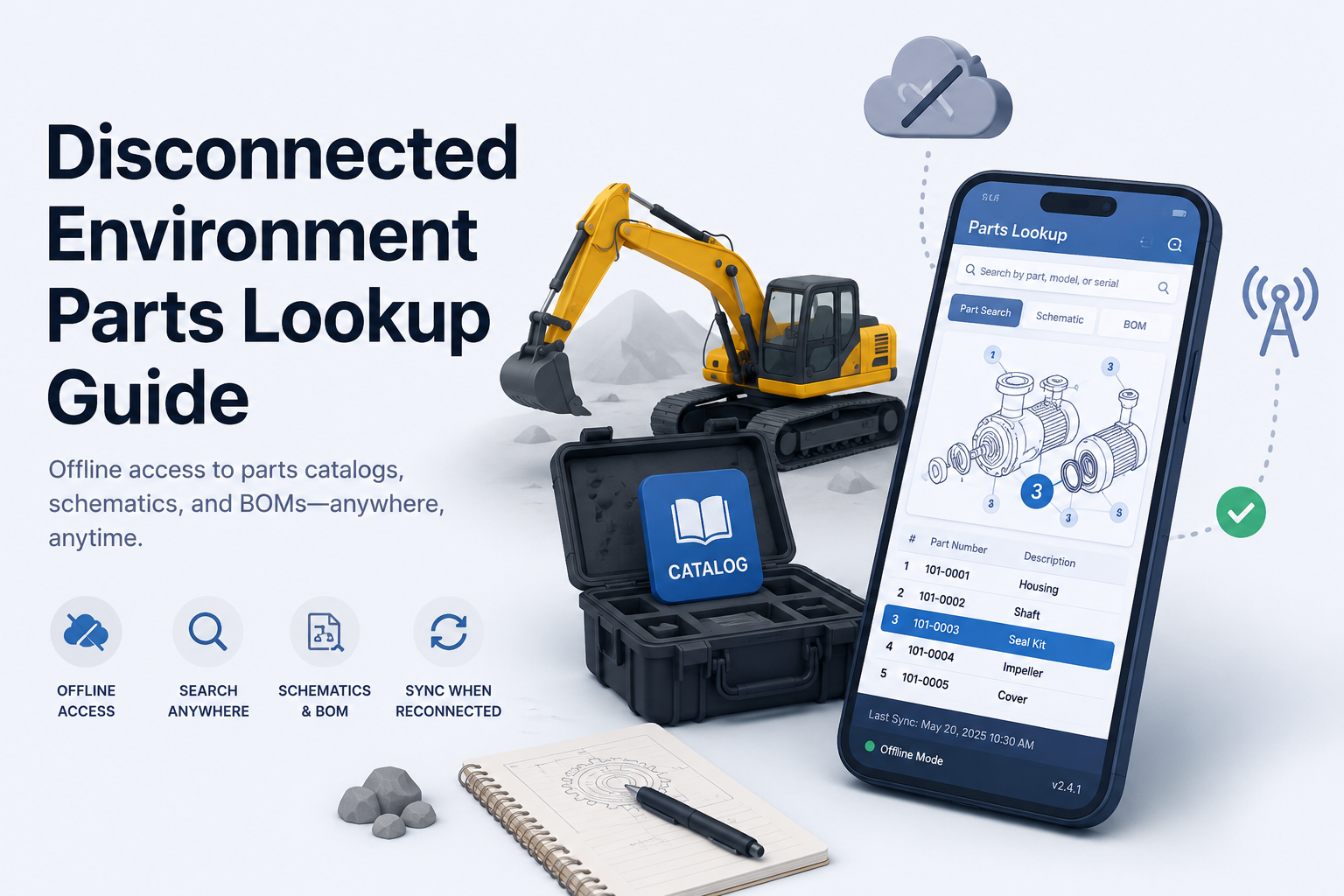
Field service technicians at remote agricultural, construction, or mining sites often work miles away from reliable cellular coverage. When equipment breaks in a dead zone, they still need to identify the exact replacement part to fix the machine. Disconnected environment parts lookup provides the ability to search an equipment parts catalog, open schematics, inspect bill of materials (BOM) relationships, and identify a part without an active network connection. Reliable offline lookup requires a coordinated local data system, not a downloaded PDF manual. Critical read operations pull from local data, while synchronization and live business validation happen after reconnection.
Understanding the underlying architecture helps separate a true offline catalog from a temporarily cached website. An offline-first application treats local storage as the primary data source for reads, rather than falling back to it only when network requests fail. An offline package is a selected subset of catalog data synchronized specifically for field use, whereas distributed media involves installing software and catalog data on a local PC or network. A cached web page stores specific browser resources but lacks structured offline search unless paired with local database technology. Systems Online builds mobile catalog packages that synchronize all or part of an EzParts catalog for out-of-network use, alongside distributed-media installations for local desktop environments. Equipment manufacturers use these systems to deliver complete, searchable catalogs to dealer networks and field service teams regardless of local connectivity.
Build a Searchable Offline Parts Catalog
Downloading an entire record set is not always the best operating model for a mobile device. Microsoft advises against using an offline filter for all records and recommends limiting the amount of data for better sync performance, so an offline profile can focus on records related to scheduled work orders. Administrators can use table filters and related-record filters to control which records the profile downloads. As a result, restricting a downloaded offline profile improves synchronization efficiency by reducing the amount of data transferred.
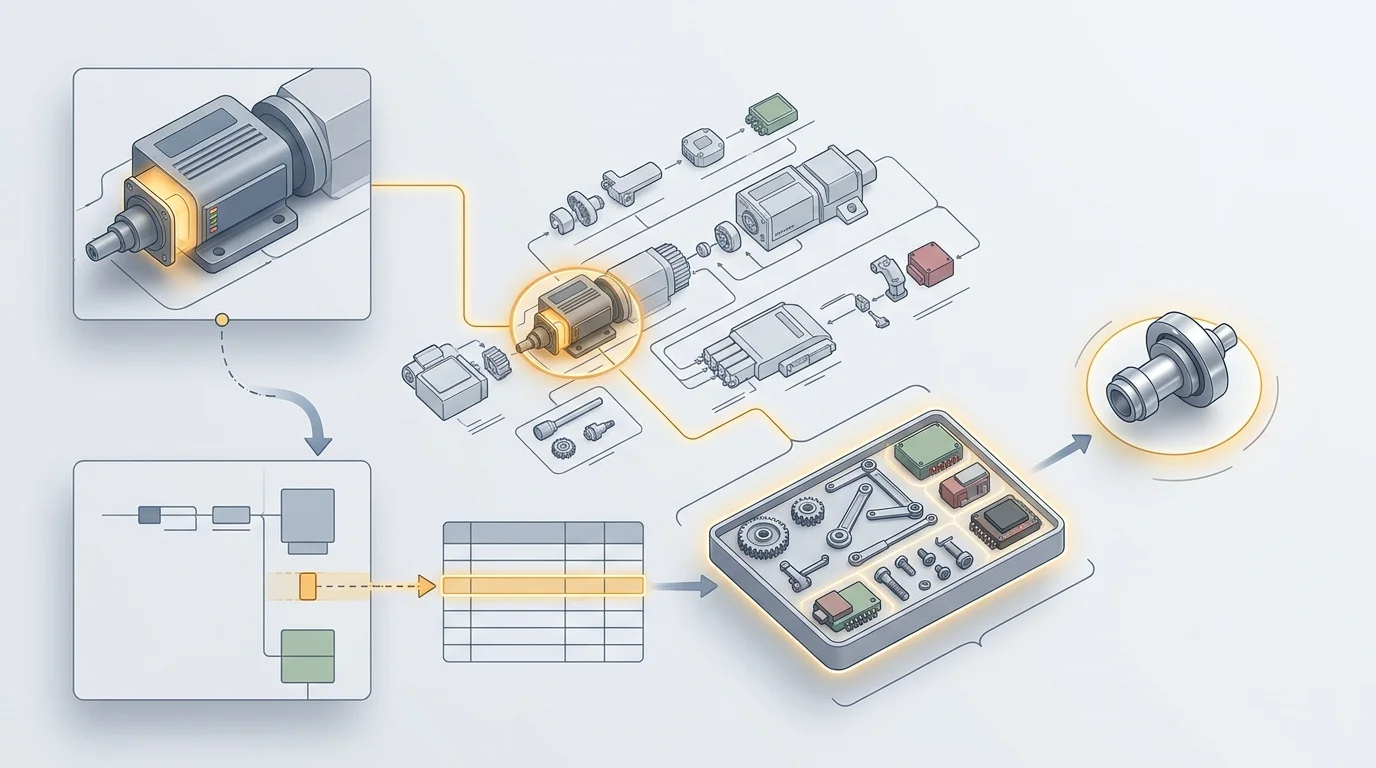
A properly scoped package requires a local index that supports complete database queries using exact part numbers, partial numbers, text descriptions, model identifiers, or serial numbers. The index also supports searches by catalog ID, schematic reference, equipment family, and manufacturer-defined metadata. Finding the part is only the first step. The interface provides an unbroken identification chain from the initial search result to the visual schematic hotspot, down to the BOM line, and finally to the exact part record.
Visual identification prevents costly ordering mistakes when components look similar or have ambiguous names. The offline package stores interactive 2D and 3D schematics alongside the data layer, allowing technicians to rely on multi-shape hotspots mapped directly to clickable BOM rows. Offline BOM lookup offers more utility than a flat parts list because it preserves the physical context of the component within the assembly. A structured local database retains parent and child assembly hierarchies, nested kits, required installation quantities, technical service notes, and where-used navigation links. If a user selects a hydraulic pump assembly, the offline catalog allows them to expand the kit components and verify whether they need the entire assembly or a specific seal.
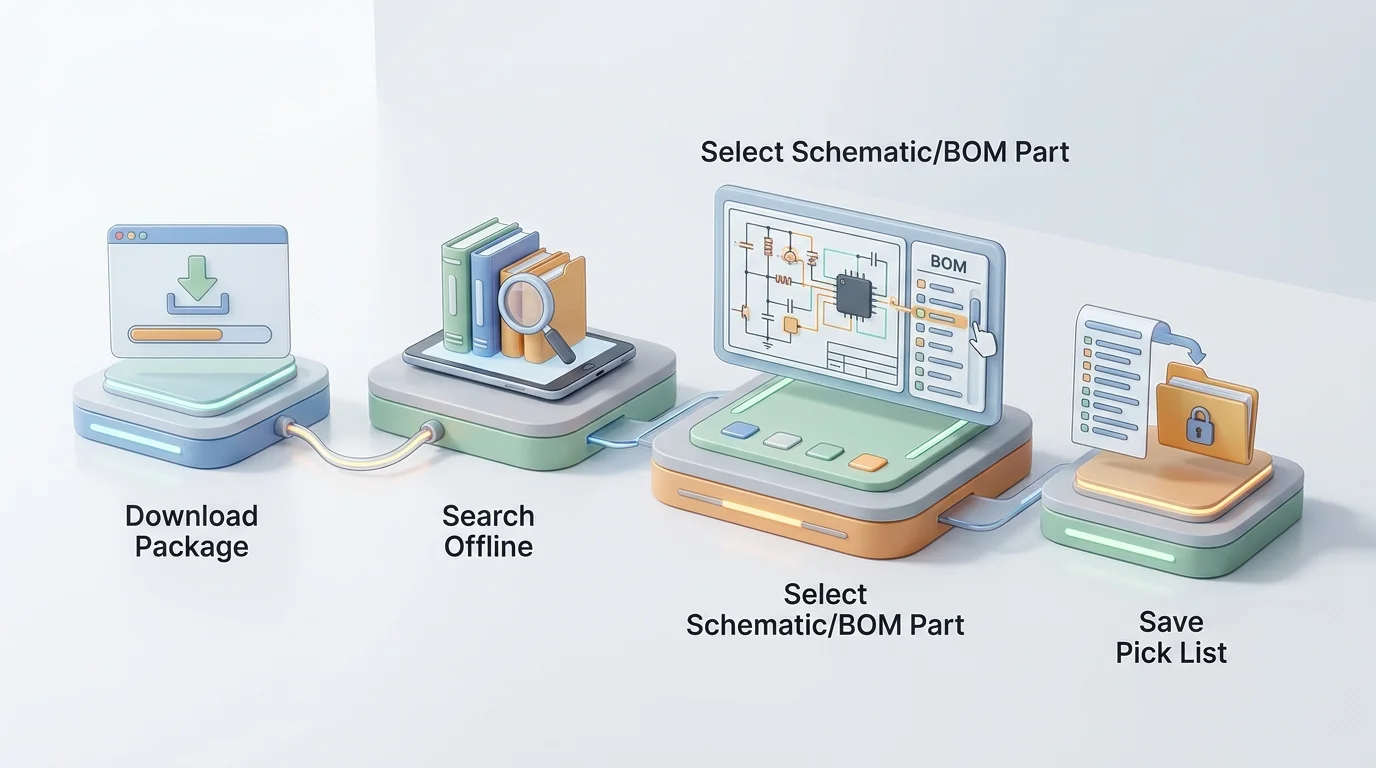
Disconnected environments complicate replacement-part logic. A supersession lookup in the field acts as a versioned snapshot of approved replacement chains, showing the original part number, the currently approved replacement, any discontinued state, and whether the replacement changes the required kit or assembly. Because this data is a snapshot, visible freshness indicators are necessary. The catalog interface displays the last synchronization date and time, the package version, included equipment models, and any failed downloads. Technicians can see whether pricing and inventory data is live, cached, or unavailable. A user can search a serial number offline, open an exploded view, expand a kit, and save the approved replacement part to a local pick list.
Compare Offline Catalog Delivery Models
Different operating environments require different delivery methods, and treating every offline method as equivalent ignores how field technicians work. A static PDF is easy to distribute and useful as a backup document, but it fails as a primary tool because it lacks structured search, interactive hotspots, BOM logic, supersession workflows, and order handoff paths. An online-only web catalog centralizes updates and guarantees live business data, yet it becomes completely useless during a network outage.
Web-based implementations using service workers face inherent caching and data freshness trade-offs. A cached web application or Progressive Web App (PWA) can serve stored interface resources without a network request, allowing those resources to support offline operation. Deliberate caching and resource-specific strategies balance offline operation with freshness requirements, while cache-first and network-first approaches define how the application handles cached resources and network requests.
An offline-first native mobile application provides strong field usability, integrates with device features, and controls package delivery. This model shifts responsibilities toward device deployment, update management, and local data security. Alternatively, distributed media installs catalog software and data directly on a local PC or network, updating through approved internet channels or electronic media. This method suits manufacturing plants, large service centers, and heavily controlled disconnected facilities.
| Approach | Primary Strengths | Major Limitations | Best Fit |
|---|---|---|---|
| Static PDF | Easy to distribute, print, and archive locally. | Lacks search, hotspots, nested BOM logic, and order workflows. | Backup documentation and print-oriented users. |
| Online-Only Web | Centralized updates, live business data, no local sync required. | Fails completely without an active network connection. | Connected dealerships and corporate offices. |
| Cached Web / PWA | Browser-based delivery, standard responsive interface. | Storage limits, browser eviction policies, complex offline write design. | Organizations managing offline complexity via browser. |
| Offline-First Mobile | Local reads, fast performance, scoped offline packages. | Requires mobile device deployment and local data security governance. | Field technicians and mobile dealer personnel. |
| Distributed Media | Runs on local PCs/networks, supports controlled update paths. | Requires local IT management and version control oversight. | Plants, service centers, and remote fixed facilities. |
A hybrid model serves original equipment manufacturers with mixed environments. Dealers utilize connected web portals and eCommerce ordering, field technicians carry offline mobile packages tailored to their assigned jobs, remote service centers rely on distributed-media installations, and print-oriented users generate PDF output from the same source data. Systems Online supports this multi-channel delivery framework to ensure the same catalog content reaches every user through the appropriate technical channel.
Maintain a Reliable Offline-to-Online Workflow
Operating an electronic parts catalog across dead zones requires a specific sequence of actions. Before leaving network coverage, technicians sign into the application to authenticate their session and identify authorized equipment models. They download the required catalog package, confirm its scope, check the last-update timestamp, and test the application with device connectivity disabled. Validating the package while still connected prevents arriving at a remote site with an empty database.
At the disconnected job site, the technician searches the local database by model, serial number, or specific part description. They open the relevant equipment schematic and select the broken component by tapping a visual hotspot or selecting the corresponding BOM line. The application displays the required quantity, technical service notes, nested kit components, where-used information, and the stored supersession chain so the technician can save the selection to a digital pick list or local job record. The interface clearly distinguishes available local catalog data from business data that requires reconnection. Inventory counts, customer-specific pricing, branch availability, tax calculations, and fulfillment routing remain unavailable or marked as stale until the device re-establishes a connection.
Connectivity triggers the final validation stage. The application synchronizes catalog updates and pushes the local job record to the central server, then revalidates all replacement-part relationships against the live database to ensure the field selection remains accurate. The system checks current inventory levels and pricing before routing the request through the correct dealer or branch location. Conflict-handling rules determine how the system resolves synchronization errors, prevents duplicate submissions, and ultimately sends the verified order into the enterprise resource planning (ERP) or eCommerce workflow.
Test and Govern the Offline Catalog
A vendor stating their product works offline does not guarantee it will support a complex field service workflow. Equipment manufacturers and dealer networks evaluate catalog solutions through targeted testing, starting with content and package-control capabilities. Evaluators check whether users can search the local database by part number, text description, model, serial number, schematic reference, and manufacturer-defined attributes. They verify that 2D and 3D schematics remain interactive without a connection, ensuring hotspots link correctly to BOM rows and that assemblies, kits, quantities, and where-used relationships survive the download process. System administrators also need granular control over content distribution by territory, language, dealer authorization, or assigned technician job.
Transaction and integration tests verify the procurement path. Teams test whether technicians can create an offline pick list or shopping cart, and they define exactly how reconnection triggers pricing updates and inventory validation. The platform reports synchronization errors clearly and prevents technicians from submitting duplicate orders when a connection drops and restores rapidly.
Mobile devices can process sensitive enterprise data, so they need security management. The NIST guidance on mobile-device security describes technologies and strategies for securing them, including centralized device management and endpoint protection. Its recommendations span deployment, use, and disposal. Organizations should therefore address security throughout the mobile-device life cycle.
Running acceptance tests that simulate real disconnection scenarios reveals hidden flaws. Testers force the application into airplane mode and execute a local search, attempt a manual package update over a metered connection, and interrupt a download to observe how the application handles an incomplete package. Changing a supersession relationship on the server demonstrates how the stale field record behaves upon reconnection. Evaluating concurrent record changes from multiple devices highlights the conflict resolution logic, making a proof-of-concept under these exact conditions a baseline requirement before deployment.
How Systems Online’s EzParts Fits the Model
Systems Online engineers EzParts for manufacturers that need to distribute single-source parts information across different operating environments. A heavy equipment dealer can use the connected catalog and integrated eCommerce workflow, while a field technician synchronizes specific machine models to their mobile device for a remote repair job. An offshore rig or isolated mining facility can deploy a local distributed-media installation when continuous connectivity is physically impossible. This approach builds the catalog strategy around the user's environment rather than forcing a single delivery channel on every audience.
The platform carries critical functionality into the field. Mobile and distributed-media deployments support interactive schematics, multi-shape hotspots, clickable BOM lines, and precise model and serial searches. The local database maintains kit and assembly nesting, where-used navigation, and supersession displays. Once connectivity is restored, the system bridges the gap between identification and procurement by passing validated pick lists into ERP systems or integrated eCommerce carts, and the print engine dynamically generates branded PDF parts books for users requiring physical documentation.
Deploying a comprehensive parts platform requires aligning the software with your specific business logic. An architecture plan can account for fully offline order creation, the display of live versus cached pricing, and the mobile operating systems your field teams carry. It also needs clear conflict-handling rules, named ERP connectors for your environment, and an audit of every technical document or 3D asset needed in the mobile package. Explore how a distributed-media parts catalog provides local installations for fixed facilities, review how interactive schematics and BOMs prevent ordering mistakes, and map the path to an integrated parts eCommerce workflow.
FAQs About Offline Equipment Parts Lookup
What Is Disconnected-Environment Parts Lookup?
It is the ability to search an equipment parts database, navigate visual schematics, inspect BOM hierarchies, and identify accurate replacement parts without an active network connection. A complete solution stores structured catalog data locally on a device rather than merely displaying a static text document.
Can an Electronic Parts Catalog Work Without Internet?
Yes, provided the application features local lookup capabilities and synchronizes the required catalog package in advance. The content available in the field depends entirely on what the user downloaded before losing connectivity. Mobile applications and distributed-media installations maintain their own local data layers for this exact purpose.
Is an Offline PDF Enough for Field Service?
A PDF provides decent backup reference material, but it does not function as a primary electronic parts catalog. It lacks structured database search, interactive hotspots, nested BOM relationships, supersession handling, and any digital path for submitting an order.
Does Offline Access Include Live Inventory and Pricing?
Not generally. Live inventory counts, branch availability, and customer-specific pricing depend on real-time business data. An offline application displays a cached snapshot of this information, and the software revalidates pricing and availability against the live system once the device reconnects.
How Should OEMs Handle Superseded Parts Offline?
The offline package needs to include all approved supersession chains current at the time of download. The interface clearly displays the package version and last-update status, warning the technician that replacement relationships require revalidation upon reconnection.
What Does Distributed Media Mean?
Distributed media means the catalog software and database are installed directly on a local PC or facility network, rather than accessed through a remote hosted server. Installations receive updates via approved internet channels or physical electronic media, supporting locations with restrictive security policies or limited connectivity.
How Should Offline Catalog Data Be Secured?
Organizations can secure local catalog data with standard mobile-device protections, including encryption at rest, secure key handling, strict role-based access controls, and integration with enterprise mobile device management systems. The application supports remote or selective wipe capabilities to protect proprietary pricing and customer data if a device is lost.
Ready to modernize your aftermarket parts operations across every environment? Explore Systems Online to build an electronic parts catalog that works online, offline, and everywhere in between.
Modified on: 08/26/2026