Blog » B2B Ecommerce Customer-Specific Pricing for Equipment Manufacturers
B2B Ecommerce Customer-Specific Pricing for Equipment Manufacturers
When two authorized dealers log into a manufacturer's portal to order the same hydraulic pump, they often see different numbers. The cost of an aftermarket part depends on the purchasing company, its active commercial agreements, and specific volume thresholds. Resolving the right figure for each buyer means translating these complex business rules into a reliable storefront experience.
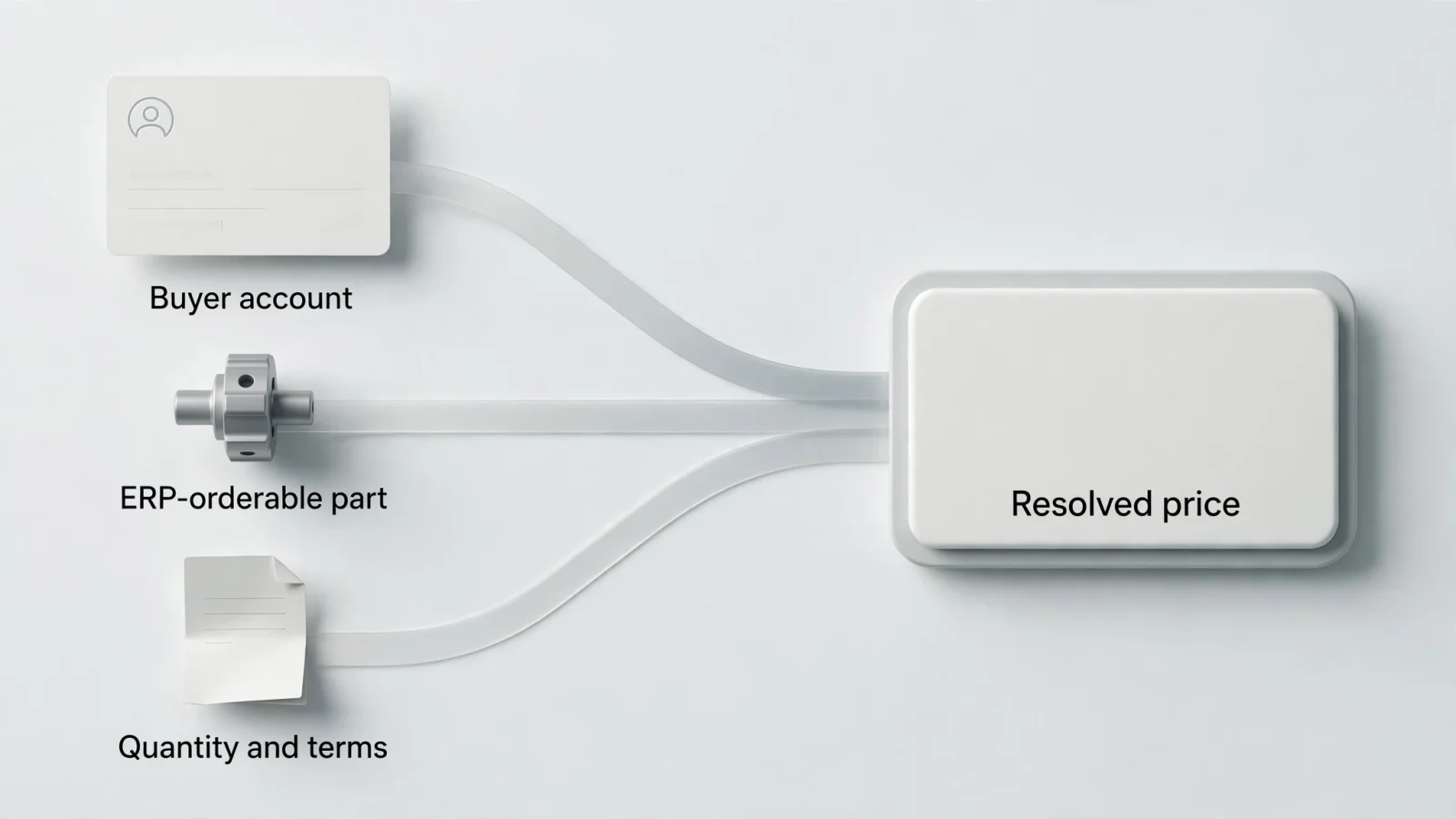
Customer-specific pricing in B2B ecommerce controls this process. Instead of displaying a universal sticker price to every visitor, the platform calculates the final amount based on the user's account and the applicable commercial terms. For whole goods and equipment manufacturers, moving from manual quoting to digital ordering involves building a system that can accurately identify the buyer, pinpoint the orderable component, and apply the right rule.
Systems Online builds EzParts to handle this workflow. Users identify the correct equipment component visually, and the platform resolves the account-specific price before the order passes to the business system. Deciding how to set this up involves evaluating pricing models, rule precedence, integration architecture, and fallback behaviors.

Match the Pricing Model to the Commercial Agreement
Translating physical contracts into digital storefronts means mapping your existing commercial terms to specific software functions. Manufacturers typically use a combination of pricing models across their dealer networks and direct buyer accounts, with each model behaving differently when base costs change.
A customer-specific contract price establishes a negotiated net rate for a named customer and a specific item. This model locks in the cost regardless of standard catalog fluctuations. Group or dealer-tier pricing, by contrast, applies a shared rate to an eligible group of accounts. A manufacturer might assign all gold-tier agricultural dealers to one price group, ensuring they all receive the same preferred rate for combine harvester parts.
The structure of the discount also plays a role. Shopify's documentation explains how fixed product prices and overall percentage adjustments function differently in B2B catalogs. If a part's base cost goes up in the ERP, a fixed contract price stays the same, allowing the buyer to continue paying the negotiated flat rate. A percentage adjustment applies the agreed discount to the new base price, changing the final amount the buyer pays. Aligning the software model with the legal language in your dealer agreements prevents billing discrepancies.
Volume or quantity pricing introduces another layer of calculation, triggering a price break based entirely on order size. SAP's S/4HANA sales-pricing documentation details using condition records as master data to determine a transaction's final amount. This structure supports complex pricing scales that adjust dynamically as the user adds more items to their cart.
Account-specific assortments relate closely to these models, though they control visibility rather than calculation. Adobe Commerce B2B shows how custom catalogs and prices can attach to particular company accounts. A catalog limits which parts an account can browse, while the pricing rules determine what those eligible parts cost. Restricting a landscaping dealer from viewing heavy construction equipment ensures they only see prices for components they service and sell.
Define Precedence for Overlapping Rules
Conflicts happen when an account qualifies for multiple pricing rules on the same item. If a dealer has a 10 percent contract discount on all filters but a specific air filter currently carries a seasonal promotional price, the platform needs instructions on which amount to charge.
In Dynamics 365 Commerce, overlapping conditions follow the configured pricing rules. Microsoft's price-management documentation explains how customer scopes and pricing priorities determine which prices or discounts apply. Planning those rules before launch helps teams identify why a particular price or discount applies to a transaction.
The exact order of operations for contract terms, group tiers, quantity breaks, and temporary promotions determines the outcome. If your rules stack, a dealer receiving a 5 percent tier discount might see that applied on top of a volume break. Alternatively, the system can enforce the single lowest price.
Authorized exceptions need a clear process. Field service representatives often negotiate one-off deviations for large restocking orders or urgent repairs. Routing these exceptions through an approved quote workflow, rather than silently overriding a recurring contract price in the master database, keeps the data clean. A dedicated quote path allows the buyer to request a special rate, submits the request for approval, and applies the custom price to that single transaction.
Choose Between Live Queries and Synchronized Data
The architecture you choose for resolving prices dictates the speed, accuracy, and reliability of your ordering portal. Choosing whether the ecommerce storefront calculates the final amount itself or asks the ERP for the answer shapes the entire user experience.
Live price requests ping the ERP or an external pricing service at the exact moment the user loads a product page or adds an item to their cart. This setup provides an exact match. The buyer sees the figure stored in the central business system, reflecting changes made seconds prior. The trade-off involves latency and dependency. If the ERP takes three seconds to calculate a complex condition record, the product page takes three seconds to load. If the ERP undergoes scheduled maintenance, the storefront cannot resolve prices or accept firm orders.
Synchronized data models move the calculation logic into the ecommerce platform. The ERP pushes base prices and condition records to the storefront through batch updates, allowing the portal to calculate the final amount independently. This architecture delivers near-instant page loads and protects the ordering process from ERP outages. The cost of this resilience is data freshness. If a base price changes at noon but the batch update runs at midnight, buyers will see and purchase at the outdated rate for twelve hours.
Systems Online supports both approaches. EzParts can fetch dealer or consumer real-time pricing from external systems based on the required data elements. The software accommodates live requests for environments demanding absolute accuracy, or it accepts data updates during latency periods for environments prioritizing speed and uptime. Integrating this capability into a broader manufacturing dealer enablement portal ensures technicians have the right parts information alongside their specific commercial terms.
Identifying the authoritative price-resolution path for your business and enforcing it consistently prevents errors. The figure displayed on the initial catalog page must match the cart, the checkout screen, and the final order submission. Discrepancies between these stages erode trust and generate costly customer support tickets.
Verify Account and Part Mapping
A perfect pricing engine will generate the wrong amount if it receives the wrong variables. Customer-specific pricing in B2B ecommerce relies on correctly identifying both the purchasing entity and the target item.
Identifying the buyer accurately means deciding whether the pricing condition attaches to the parent company, a regional dealer, or an individual branch location. A national equipment distributor might negotiate a master contract for their entire organization, while independently owned franchise locations hold different tiers. Confirming how each user login maps to these buying entities matters. If a technician logs in under a generic branch account, the system applies the branch's tier, missing any individual contract terms negotiated by the parent company.
Mapping the part to the orderable item creates a similar challenge. In aftermarket equipment sales, the item a technician visually identifies does not always match the item the ERP sells. Manufacturers frequently update components, issue supersessions, and replace single parts with mandatory service kits. If a user finds a discontinued bearing on a legacy schematic, the catalog might display the old reference number, but the pricing query needs to run against the active, orderable ERP item that replaces it.
Grouped items and bills of materials complicate this mapping further. A technician might click a single hose within a hydraulic assembly. If the manufacturer only sells that hose as part of a complete kit, the storefront must resolve the kit's identifier and request the kit's price. Requesting a price for a non-orderable sub-component returns an error or a zero value, halting the transaction.
Deploying a visual parts search engine solves the identification phase by allowing users to click hotspots on 2D and 3D diagrams to find the right component. Your electronic parts catalog import automation then links those visual hotspots to the active ERP material master. This sequence visually identifies the component, resolves the orderable item, applies the buyer's conditions, and passes the right amount through the configured business flow.
Establish Fallbacks and Offline Expectations
Software services occasionally fail, APIs time out, and technicians frequently work in environments without internet access. Defining what happens when the portal cannot resolve a price keeps the platform stable.
Configuration choices determine what the buyer sees if the live pricing service is unavailable or returns no valid data. The system can block the purchase completely, preventing any order from entering the ERP with a zero value. Alternatively, the software can convert the failed transaction into a quote request, allowing the dealer to submit their cart for manual review. Displaying a cached or last-known value during an outage requires clearly marking the figure as indicative and forcing revalidation before final order placement.
Offline environments require specific handling. Field service technicians often repair equipment in remote agricultural sites, deep underground mines, or shielded industrial facilities where cellular connections drop. Systems Online provides offline access to mobile parts and schematic information, ensuring technicians can always consult technical diagrams. Catalog data synchronizes automatically when the device reconnects to a network.
Offline access to a parts diagram does not guarantee that an offline price is current or that an offline cart is orderable at that amount. Showing a dated cached price helps technicians estimate repair costs for the end customer, provided the interface clearly displays the date the cache was last refreshed. Standard implementations allow the technician to build an offline cart using indicative amounts. The application then automatically queries the ERP for current customer-specific pricing the moment the device regains connectivity, requiring the user to accept any changes before the order finalizes.

Implementation Checklist and Decision Aid
Deploying these rules effectively involves aligning your integration strategy with your dealer network's specific needs. Use this matrix to evaluate which architectural decisions best fit your commercial environment.
| Commercial Scenario | Recommended Configuration | Primary Trade-off |
|---|---|---|
| High daily price volatility (Commodity materials, frequent tariff adjustments) | Live ERP query at add-to-cart and checkout. | Slower page loads; ordering halts during ERP maintenance. |
| Complex volume and tier stacking (Multiple conditional discounts per order) | ERP-calculated pricing via API. | Requires robust error handling if the API times out. |
| Strict SLA for page speed (Large dealer networks expecting retail-like speed) | Synchronized batch updates to the ecommerce platform. | Prices may lag behind ERP changes between sync intervals. |
| Frequent offline field service (Remote repair operations) | Cached indicative pricing with forced revalidation upon connection. | Technicians cannot guarantee exact repair costs while disconnected. |
| One-off volume negotiations (Dealers requesting special rates for fleet repairs) | Configured quote-request workflow blocking standard checkout. | Increases manual review time for the sales team. |
A successful launch involves testing specific conditions to ensure the system resolves the correct figure under varying circumstances.
- Test branch assignments: Log in with two different dealer accounts assigned to different pricing tiers. Add the identical part to both carts and verify the amounts differ according to the contract.
- Test volume thresholds: Add a single unit to the cart, note the price, and then increase the quantity past a known volume break. Verify the unit cost recalculates immediately.
- Test temporal agreements: Create a test contract that expired yesterday and one that begins tomorrow. Verify the system applies the standard base rate today and does not honor the inactive terms.
- Test supersessions: Select a discontinued part from an older equipment schematic. Verify the cart automatically updates to the replacement part and fetches the price for the new active item.
- Test failure modes: Deliberately break the connection to the external pricing service. Verify the storefront displays your chosen fallback behavior, such as a quote request form, rather than crashing or submitting a zero-dollar order.
Connecting the Digital Parts Experience
Resolving the correct cost is only one phase of the aftermarket ordering cycle. If a technician cannot confidently identify the required component, a perfectly calculated discount becomes irrelevant. The system will apply the right rule to the wrong item, resulting in costly returns and extended equipment downtime.
Integrating your commercial rules into a B2B customer portal for manufacturers ensures the workflow functions smoothly. The interface guides the user from visual identification through supersession mapping, price resolution, and final order placement. Documenting precedence rules, mapping accounts accurately, and choosing the right integration architecture ensure that when the dealer clicks submit, the transaction is processed by the ERP without manual intervention.
Systems Online develops EzParts to help equipment manufacturers eliminate aftermarket ordering errors and increase parts revenue. By delivering interactive 2D and 3D schematics across cloud, mobile, and offline environments, EzParts ensures dealers and technicians can identify the right component and resolve the correct account-specific price anywhere. Visit sysonline.com to learn how our multi-channel electronic parts catalog integrates with your existing ERP to streamline your B2B ecommerce operations.
Modified on: 11/11/2026