Blog » How Technicians Order Parts Without Internet
How Technicians Order Parts Without Internet

Technicians can identify replacement parts without internet access by using paper manuals, locally stored PDFs, distributed electronic parts catalogs, or mobile apps with preloaded offline data. Although they can create a parts list, cart, or parts requirement while disconnected, a standard cloud order is usually not submitted until the device reconnects to a network, unless the business provides a separate communication path or local ordering system.
Understanding how technicians order parts without internet requires separating parts identification from transaction processing. A saved request allows a technician to document exactly what a repair needs while standing next to the equipment, which prevents transcription errors and eliminates the need to rely on memory during the drive back to coverage.

Differentiating Offline Parts Lookup from Order Submission
Field service teams often blur the line between finding a part and buying a part, but the software running those processes treats a saved cart differently than a submitted order. Accurately managing field inventory requires distinguishing offline lookup from transaction processing.
Technicians operate in three different connectivity situations. The first is a facility with no public internet access but an active local area network, such as a remote mining site, dealer depot, or service truck running internal servers. In this environment, a locally installed catalog like Systems Online’s EzParts Distributed Media allows technicians to search parts data and communicate with local business systems.
The second situation involves no network connection, leaving the technician to work from data downloaded to the device for offline use. That setup supports offline work, but inventory validation requires network connectivity, so it cannot run while the device is offline.
The third situation involves no communication path whatsoever. A technician identifies the required part, but the actual request waits on the device until a connection returns, unless they use a separate approved channel like calling a parts desk via radio or satellite link.
Even with full catalog access in the field, submitting the request to the enterprise resource planning (ERP) system, validating live inventory, processing payments, and triggering warehouse fulfillment almost always wait until synchronization.
Five Ways Technicians Handle Parts Requests Offline
Field service teams rely on five practical approaches to handle disconnected parts lookups, with each method balancing reliability against the manual effort required to complete the order.
Paper Manuals and Saved PDFs
A paper manual works without a battery, application, or network connection, serving as a reliable emergency fallback in harsh environments. However, relying on paper requires a technician to find the equipment model, locate the exploded view, record the part number, and relay that information to a dispatcher. This manual transcription introduces errors, particularly because physical manuals lack automated supersession logic for replaced parts.
Saved PDF parts books improve distribution since a technician can download the document to a laptop or tablet before traveling to a disconnected site. While PDFs are simple to share and useful for servicing legacy equipment, they function as static documents instead of structured databases. Searching a PDF rarely filters parts by specific serial numbers, and the format lacks a native cart or pick list workflow.
Local or Distributed Electronic Parts Catalogs
A distributed electronic parts catalog (EPC) installs the application and catalog data directly onto a local computer or network server, offering full interactive capability without public internet. Technicians get structured data, clickable schematics, and accurate bills of materials (BOM) hosted entirely within the facility. The main limitation is update control, as the organization must distribute catalog updates via physical media or schedule synchronization when an intermittent connection allows it.
Mobile EPCs and Store-and-Forward Apps
Mobile EPCs deliver catalog data to phones or rugged tablets through offline packages. By downloading the relevant equipment models and parts data before leaving coverage, the technician gains visual lookup capabilities right at the machine. These offline packages require careful management, because device storage is limited and stale data leads to incorrect part selections.
Store-and-forward field service applications integrate parts requests with work orders by downloading required data, recording technician actions locally, and uploading the changes when connectivity returns. ServiceNow handles this by letting field workers create part requirements offline and view those actions in an outbox for later synchronization. Server-side validation rules and final order confirmation then wait for that reconnection.
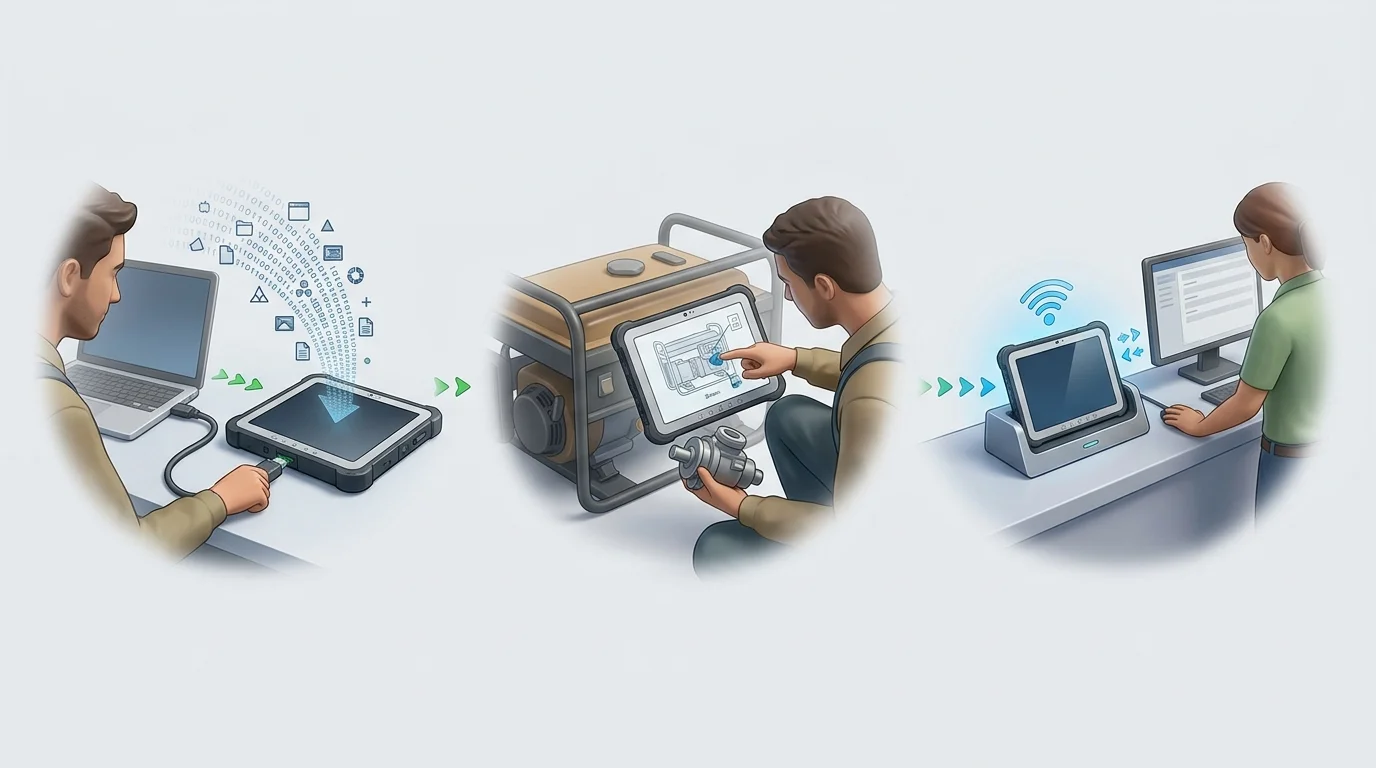
Step-by-Step: How an Offline Parts Request Works
A reliable disconnected workflow requires preparation before the technician ever leaves a connected zone, and the process breaks down into three distinct phases.
Prepare the Device Before Leaving Coverage
Securing the correct data beforehand prevents delays at the job site. The technician identifies the assigned machines or equipment families for the day, downloading only the required catalog content to conserve storage and speed up synchronization.
After checking the last synchronization time and catalog revision number, the technician can open the application in airplane mode as a practical pre-departure test. This confirms that the exact models, configurations, schematics, and part relationships load successfully without a network.
Identify and Queue the Part While Disconnected
When a technician repairs an agricultural machine in a remote field with no cellular signal, they can open the application to select the machine model, define the serial range, and navigate to the hydraulic assembly schematic.
Tapping a specific hydraulic component on the interactive illustration highlights the matching line item in the BOM. Because the catalog displays locally available supersession data, the technician can see if the original valve was replaced by a newer part number. They then add the replacement part and required quantity to a pick list, associate the request with the active work order, and save it so the system can mark the status as pending synchronization.
Reconnect, Reconcile, and Submit
Driving back into cellular coverage allows the device to connect to the central system and synchronize the offline changes. The application immediately refreshes availability, applies current pricing, and checks fulfillment logic.
Microsoft gives a concrete example: a conflict occurs when a field technician and a dispatcher edit the same work order without syncing their changes. It explains that the app resolves synchronization conflicts according to an administrator-selected setting. With conflict detection enabled, the dispatcher's changes overwrite the technician's offline changes, and administrators can review past sync errors.
What Information Does an Offline Catalog Require?
An effective offline workflow requires specific data structures to remain useful in the field, because missing fitment data forces a technician to guess which part variant applies to a particular machine.
Equipment and Fitment Data
Equipment identification needs to go beyond the basic model name. The offline package relies on the product family, model, serial-number range, and specific asset identifiers like a VIN, while configuration data and effective dates dictate which parts apply to machines built during different production runs.
Parts data requires equal depth, meaning the offline catalog includes the part number, description, quantity, unit of measure, and BOM position. Visual references and where-used details confirm the technician is looking at the correct component. Alternative parts, kits, and supersession chains prevent ordering discontinued components that would guarantee a failed repair. You can explore how interactive BOM and supersession management structures this data to support accurate selection.
Part Identification and Request Preparation
Request preparation uses a distinct set of fields to store the work-order reference, customer details, ship-to information, and the needed-by date. The application needs a mechanism to save a cart or pick list, record technician notes regarding urgency, and clearly display an outbox or pending-request status.
What Waits for Reconnection
Live inventory levels become unreliable offline, as a warehouse might allocate the last available component to another user while the technician is disconnected. Current pricing, warehouse allocation, and new engineering changes similarly rely on real-time server connections.
For offline use, Oracle documentation lists Parts Catalog searches among the available tasks when the catalog has been provisioned and cached.

Offline EPC Versus PDF Parts Manuals
When manufacturers debate whether to invest in a structured offline catalog or distribute PDF manuals, the practical differences emerge immediately as a technician attempts to build an accurate order from the field.
| Capability | Structured Offline EPC | PDF Parts Manual |
|---|---|---|
| Search and Filtering | Filters dynamically by serial number or VIN. | Relies on manual text search across all configurations. |
| Visual Selection | Interactive hotspots map directly to BOM items. | Requires visual matching of callout numbers to text tables. |
| Supersessions | Displays replacement chains automatically (based on last sync). | Rarely updated; requires separate bulletins or manual checks. |
| Order Preparation | Supports native carts, pick lists, and work-order links. | Requires writing parts down on paper or in a separate notes app. |
| Business System Handoff | Synchronizes data directly into dealer or ERP workflows. | Requires manual data entry by a dispatcher or parts counter. |
A structured EPC reduces manual transcription and identification risk because the technician clicks the illustration and the software handles the part number. While PDFs remain useful for legacy equipment or quick reference, multiple document revisions easily circulate across a dealer network, leading to outdated part orders. Ultimately, PDFs function as reference material, whereas a governed offline EPC creates a repeatable parts-request workflow.
How EzParts Supports Disconnected Technicians
Systems Online builds an offline electronic parts catalog architecture specifically for equipment manufacturers handling remote service environments. EzParts provides multi-channel delivery, ensuring the catalog functions consistently across cloud, mobile, and local deployments.
For remote facilities, dealer depots, or service ships lacking continuous public internet, EzParts Distributed Media installs directly on a local PC or network. Updates are delivered through an intermittent connection or loaded via physical electronic media, maintaining a controlled, interactive catalog without requiring constant cloud access.
For field technicians, EzParts supports offline mobile catalog packages that let authorized users download specific equipment models and parts data before traveling. This provides a mobile parts catalog with offline access directly at the job site.
Relying on structured parts selection, technicians use interactive 2D and 3D schematics to identify components visually. Selecting a hotspot maps directly to the correct BOM line item, and the system flags superseded parts based on the cached data. The technician then adds the correct item to a cart or pick list, where the request safely waits in a queue until the device reconnects. This eliminates manual transcription errors and ensures the ERP receives clean data.
Validating an Offline Ordering Workflow
Evaluating electronic parts catalog software requires looking past a generic "offline compatible" label. Manufacturers get the best results by validating the exact workflow their technicians will use under realistic field conditions.
Test the Full Lookup-to-Queue Flow in Airplane Mode
Enabling airplane mode on a test device to disable both Wi-Fi and cellular data provides a realistic test environment. Once in the catalog application, attempt to search for a specific machine by its serial number or VIN and verify that the 2D or 3D illustrations load correctly.
Selecting a component on the schematic should map directly to a structured BOM line item and display any supersessions or replacement chains. Adding the item to a cart or pick list, associating it with a test work order, and saving it proves whether the system clearly labels the request as draft, queued, or pending synchronization.
Check Freshness, Synchronization, and Business-System Handoffs
Reviewing how the application displays package scope confirms whether the device clearly shows the last-sync timestamp and catalog revision number. This is also the time to determine if administrators can limit catalog downloads by product line, region, or dealer assignment to save space.
Turning the network connections back on allows you to watch the synchronization process and verify how the system handles duplicate-order prevention or conflict resolution if another user altered the same record. Reliable software provides a clear audit history, allows manual retries for failed syncs, and automatically hands the approved request to the ERP or dealer system.
Clarify the Answers for Technicians and Dealers
A successful deployment aligns the needs of everyone involved: OEMs get one governed source for parts data, dealers receive refreshed availability upon reconnection, and technicians benefit from minimal typing alongside a visible outbox status. Addressing these practical realities directly during rollout builds confidence.
Since an offline request serves as a queued requirement rather than a confirmed order, cached catalogs do not show live inventory, meaning fulfillment always waits for a signal. Technicians find parts without Wi-Fi by relying on properly synced, preloaded packages instead of struggling with static PDFs. By deploying a distributed parts catalog for disconnected environments, you equip your field teams to document exact requirements onsite and fix equipment correctly on the first try.
Stop losing revenue to ordering errors caused by disconnected field environments. Give your dealer network and field technicians the interactive schematics and offline lookup tools they need to identify the correct part every time. Visit Systems Online to see how EzParts integrates with your ERP to streamline aftermarket sales.
Modified on: 09/01/2026